📌 本文讲述各项修改的原因及效果,提供面向 AI Agent 的修改 Prompt,以便提高跨主题修改的兼容性并给予 AI 更多优化空间。
- 框架版本:Astro
v6.1.8- 主题及版本:astro-theme-pure ↗
v4.1.4
1. 文章链接层级简化#
为了让文章链接①看起来更精简、②更利于 SEO、③兼容 Hexo 历史文章的链接格式,我将博客文章的 URL 路由由 /blog/{id} 修改为了 /{id}。
- Astro 默认链接示例:
https://astro-pure.js.org/blog/improve-concentration - 层级简化后链接示例:
https://astro-pure.js.org/improve-concentration
以下是修改 Prompt:
# Flat Blog URLs

- **Goal**: Change blog post URLs from `/blog/{id}` to `/{id}`
- **Reason**: `astro-theme-pure` hardcodes `/blog/` prefix in `PostPreview` component with no config option to change it

## Changes

1. **Moved route file**
   - From: `src/pages/blog/[...id].astro`
   - To: `src/pages/[...id].astro`
   - Note: `src/pages/blog/[...page].astro` (pagination list) stays at `/blog`
2. **Overrode PostPreview component**
   - Created: `src/components/pages/PostPreview.astro`
   - Source: Copied from `node_modules/astro-pure/components/pages/PostPreview.astro`
   - Change: `href={`/blog/${id}`}` → `href={`/${id}`}`
   - Fix: Changed `astro-pure/components/user` → `astro-pure/user` (correct export path)
3. **Updated imports** (4 files)
   - `src/pages/index.astro`
   - `src/pages/archives/index.astro`
   - `src/pages/blog/[...page].astro`
   - `src/pages/tags/[tag]/[...page].astro`
   - All changed from `import { PostPreview } from 'astro-pure/components/pages'` to `import PostPreview from '@/components/pages/PostPreview.astro'`
4. **Updated RSS feed**
   - File: `src/pages/rss.xml.ts`
   - Change: `link: `       /blog/${post.id}       `` → `link: `/${post.id}``

# Fix ArticleBottom Navigation Links

- **Goal**: Fix incorrect prev/next article links when using flat blog URLs (`/{id}`)
- **Reason**: `astro-pure` `ArticleBottom` component uses `Astro.url.pathname.split('/').slice(0, 2).join('/')` to calculate base path, which incorrectly includes the current post's slug (e.g., `/courses/product-management-mooc` instead of `/product-management-mooc`)

## Changes

1. **Overrode ArticleBottom component**
   - Created: `src/components/pages/ArticleBottom.astro`
   - Source: Copied from `node_modules/astro-pure/components/pages/ArticleBottom.astro`
   - Change: `const path = Astro.url.pathname.split('/').slice(0, 2).join('/')` → `const path = Astro.url.pathname.replace(new RegExp(`/${id}/?$`), '')`
   - Fix: Correctly derives base path by removing current post's ID from URL pathname
2. **Updated imports**
   - File: `src/layouts/BlogPost.astro`
   - Changed: `import { ArticleBottom, Copyright, Hero, TOC } from 'astro-pure/components/pages'` → `import { Copyright, Hero, TOC } from 'astro-pure/components/pages'` + `import ArticleBottom from '@/components/pages/ArticleBottom.astro'`
2. 链接末尾增加斜杠/(Cloudflare Pages 可选)#
修改背景说明:
- Astro 生成的链接末尾无斜杠
/,而 Cloudflare Pages 有强制 URL 规范化机制,如果用户访问了末尾无斜杠的链接,Cloudflare Pages 为了防止相对路径资源加载出错、搜索引擎生成重复页面,会自动发送一个 301 永久重定向,将用户引导至带斜杠的标准的目录地址:/posts/my-blog/,会略微降低网站速度。 - Waline 评论系统对 URL 敏感,链接末尾有无 / 会视为不同链接,导致同一篇文章的数据被分离到两个不同链接。
因此我在 Astro 配置文件 astro.config.ts 中设置了 trailingSlash: 'always',开启强制尾部加斜杠功能。
但开启后,本地预览时,跨页面跳转会因链接尾部不带斜杠而报错。为此,我给博客整体的内部跳转链接追加了尾部 /。
以下是修改 Prompt:
# Trailing Slash Consistency

- **Goal**: Add trailing slash `/` to all internal page links to match `trailingSlash: 'always'` config
- **Reason**: Without trailing slashes, local preview shows 404: `Your site is configured with trailingSlash set to always. Do you want to go to /sites/ instead?`

## Changes

1. **Updated navigation and footer links**
   - File: `src/site.config.ts`
   - Changed: 8 links — `/blog` → `/blog/`, `/message` → `/message/`, `/about` → `/about/`, `/terms` → `/terms/`, `/terms/privacy-policy` → `/terms/privacy-policy/`, `/terms/terms-and-conditions` → `/terms/terms-and-conditions/`, `/terms/copyright` → `/terms/copyright/`, `/terms/disclaimer` → `/terms/disclaimer/`
2. **Updated PostPreview component**
   - File: `src/components/pages/PostPreview.astro`
   - Changed: `href={`/${id}`}` → `href={`/${id}/`}`, `href={`/tags/${tag}`}` → `href={`/tags/${tag}/`}`
3. **Updated ArticleBottom component**
   - File: `src/components/pages/ArticleBottom.astro`
   - Changed: `href={`${path}/${prev.id}`}` → `href={`${path}/${prev.id}/`}`, `href={`${path}/${next.id}`}` → `href={`${path}/${next.id}/`}`
4. **Updated RSS feed**
   - File: `src/pages/rss.xml.ts`
   - Changed: `link: ` /${post.id} ``→ `link: `/${post.id}/``
5. **Updated Copyright component**
   - File: `src/components/pages/Copyright.astro`
   - Changed: `href='/about#sponsorship'` → `href='/about/#sponsorship'`
6. **Updated homepage**
   - File: `src/pages/index.astro`
   - Changed: `href={`/${p.id}`}` → `href={`/${p.id}/`}`, `href='/blog'` → `href='/blog/'`
7. **Updated blog list page**
   - File: `src/pages/blog/[...page].astro`
   - Changed: `href='/archives'` → `href='/archives/'`, `href={`/tags/${tag}`}` → `href={`/tags/${tag}/`}`, `href='/tags'` → `href='/tags/'`
8. **Updated tags page**
   - File: `src/pages/tags/index.astro`
   - Changed: `href='/blog'` → `href='/blog/'`, `href={`/tags/${tag}`}` → `href={`/tags/${tag}/`}`
9. **Updated search page**
   - File: `src/pages/search/index.astro`
   - Changed: `href='/blog'` → `href='/blog/'`
10. **Updated blog post layout**
    - File: `src/layouts/BlogPost.astro`
- Changed: `back='/blog'` → `back='/blog/'`3. Pagefind 搜索噪音过滤(BUG修复)#
原主题未遵守 Pagefind 规范,没有标记正文内容区域,导致 Pagefind 索引了整个 <body>,搜索结果出现页眉导航和页脚版权信息,我已提交 Issue:Pagefind integration missing data-pagefind-body attribute, causing full indexing
#164 ↗,当前未修复。
以下是修改 Prompt:
# Pagefind Search Scope Fix

- **Goal**: Fix Pagefind indexing all `<body>` content instead of only article body, causing search noise from header/footer/sidebar
- **Reason**: Pagefind logs `Did not find a data-pagefind-body element on the site` and falls back to indexing entire `<body>`, including navigation, footer, and sidebar text

## Changes

1. **Added** **`data-pagefind-body`** **to ContentLayout**
   - File: `src/layouts/ContentLayout.astro`
   - Change: `<article class='min-w-0 grow'>` → `<article data-pagefind-body class='min-w-0 grow'>`
   - Detail: Pagefind will now only index article content (title + body) on Markdown blog post pages
2. **Added** **`data-pagefind-body`** **to IndividualPage**
   - File: `src/layouts/IndividualPage.astro`
   - Change: `<article class='min-w-0 grow'>` → `<article data-pagefind-body class='min-w-0 grow'>`
- Detail: Pagefind will now only index article content on standalone pages (e.g., links, about)4. 文章时间逻辑修改#
我经常更新历史文章,而主题的文章排序函数取值更新日期,导致旧文章一更新:
- 在首页中会排至最前,但缩略卡片中显示发布日期(如 2026 年更新的文章却显示 2017 年的创建日期),让读者困惑,误以为博客很久未更新。
- 在归档页中,文章按更新日期所属年份归类,而非按发布日期,不合常理。
以下是修改 Prompt:
4.1 首页文章展示日期修改#
# Homepage Article Date Shows Updated Date

- **File**: `src/pages/index.astro`
- **Goal**: Show the last modified date (updatedDate) instead of publish date for articles in the homepage list
- **Change**: Updated time display logic (line 95)
- **Detail**:
  - Before: `{p.data.publishDate.toISOString().split('T')[0].replace(/-/g, '/')}`
  - After: `{(p.data.updatedDate ?? p.data.publishDate).toISOString().split('T')[0].replace(/-/g, '/')}`
  - Uses `updatedDate` when available, falls back to `publishDate` if not set
- Consistent with `BlogPost.astro` which uses `updatedDate?.toISOString() ?? publishDate.toISOString()` for article metadata4.2 归档页文章排序逻辑修改#
# Archives Sort by Publish Date

- **File**: `src/pages/archives/index.astro`
- **Goal**: Sort and group archives by creation date (publishDate) instead of updated date
- **Reason**: Default `sortMDByDate` prioritizes `updatedDate` over `publishDate`, and `groupCollectionsByYear` uses `updatedDate ?? publishDate` for year grouping, causing posts with updates to appear in wrong year

## Changes

1. **Removed** **`sortMDByDate`** **and** **`groupCollectionsByYear`** **imports**
   - Changed: `import { getBlogCollection, groupCollectionsByYear, sortMDByDate }` → `import { getBlogCollection }`
2. **Added custom sort logic**
   - Replaced `sortMDByDate(allPosts)` with inline sort using only `publishDate`
   - Detail: `a.data.publishDate ?? 0` ensures posts without publishDate sort to end
3. **Added custom group-by-year logic**
   - Replaced `groupCollectionsByYear(allPostsByDate)` with inline reduce using only `publishDate`
- Detail: Prevents posts from being grouped by their `updatedDate` year5. 文章置顶#

我有一篇长期维护文章「iOS 旧版 APP 推荐与降级方法(持续更新)」,为了避免其被新发布内容降低排序位置,让读者快速找到,需增加置顶功能,参考了该 Issue:新增文章置顶功能? #122 ↗。
以下是修改 Prompt:
# Article Pinning

- **Goal**: Support pinning articles to the top of blog lists
- **Reason**: [GitHub Issue #122](https://github.com/cworld1/astro-theme-pure/issues/122) — requested feature for highlighting important posts

## Changes

1. **Added** **`pin`** **field to content schema**
   - File: `src/content.config.ts`
   - Added: `pin: z.boolean().optional()` to blog collection schema
   - Usage: Add `pin: true` to article frontmatter to pin it
2. **Created local** **`sortMDByDate`** **with pin support**
   - Created: `src/utils/server.ts`
   - Source: Re-exports from `astro-pure/server` except `sortMDByDate`
   - Change: Pinned posts (`pin: true`) sort before non-pinned posts; within each group, sorted by date (newest first)
   - Detail: `Number(bPin) - Number(aPin)` ensures pinned items appear first
3. **Updated PostPreview to show pin indicator**
   - File: `src/components/pages/PostPreview.astro`
   - Added: `{data.pin && <span class='text-primary mr-1'>[置顶]</span>}` before title
   - Style: Uses `text-primary` color class for visual emphasis
4. **Updated imports** (7 files)
   - `src/pages/index.astro`
   - `src/components/home/utils.ts`
   - `src/pages/blog/[...page].astro`
   - `src/pages/rss.xml.ts`
   - `src/pages/archives/index.astro`
   - `src/pages/tags/[tag]/[...page].astro`
   - `src/pages/[...id].astro`
   - All changed from `import { ... } from 'astro-pure/server'` to `import { ... } from '@/utils/server'`

## Usage

Add `pin: true` to article frontmatter:

---
title: My Important Post
pin: true
---

Pinned articles will display `[置顶]` label and appear at the top of all blog lists (homepage, blog page, archives, tags, RSS).

1. **Added pin indicator to homepage**
   - File: `src/pages/index.astro`
   - Added: `{p.data.pin && <span class='text-primary mr-1'>[置顶]</span>}` before article title in homepage post list
- Detail: Homepage uses custom layout (not PostPreview component), so pin indicator was added separately6. 赞助(Sponsorship)模块移动至 About 页#
赞助模块默认放置在 Project 页,因我关闭了该分页,便将赞助模块转移至 About 页底部。
以下是修改 Prompt:
# Sponsorship Section Moved to About Page

- **Goal**: Move sponsorship/donation section from Projects page to About page bottom
- **Reason**: Sponsorship is more about the author than projects

## Changes

1. **Removed sponsorship from Projects page**
   - File: `src/pages/projects/index.astro`
   - Removed: `Sponsorship` and `Sponsors` component imports and usage
   - Removed: `Button`, `Icon`, `alipay`, `wechat` imports (no longer needed)
   - Removed: Sponsorship heading from `headings` array
   - Removed: Sponsorship card hover styles
2. **Added sponsorship to About page**
   - File: `src/pages/about/index.astro`
   - Added: `Sponsorship` and `Sponsors` component imports
   - Added: `alipay` and `wechat` image imports
   - Added: `sponsorship` heading to `headings` array
   - Added: Full sponsorship section (payment QR codes + sponsors list) at page bottom
3. **Updated Copyright component link**
   - File: `src/components/pages/Copyright.astro`
   - Change: `href='/projects#sponsorship'` → `href='/about#sponsorship'`
- Detail: Article page donation button now correctly links to About page7. Waline 修改#
7.1 Waline 错误换行修复(BUG修复)#
因 Astro Pure CSS 错误,Waline 中被回复人的 @用户名 名称标签与回复内容不同行,我已提交 Issue:[bug] Waline reply “@username” wraps onto a new line instead of staying inline
#165 ↗,当前未修复。
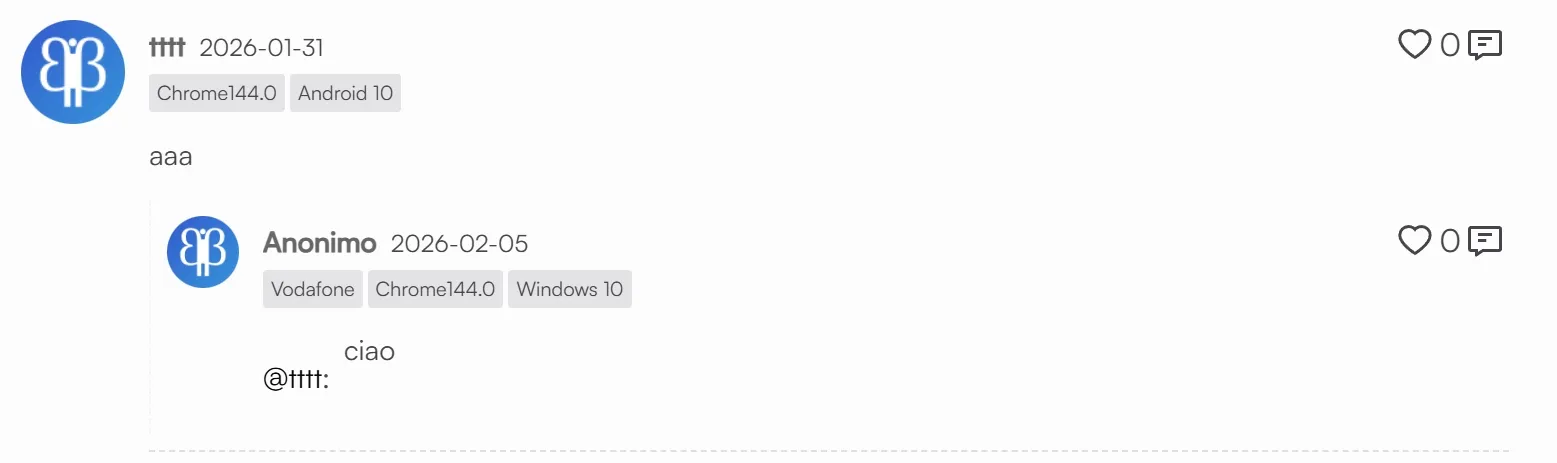
以下是修改 Prompt:
# Fix Waline Reply @ Wrapping & Astro Compiler Bug

- **File**: `src/components/waline/Comment.astro`
- **Goal**: Fix the layout issue where the "@username" tag and the actual comment text in Waline replies wrapping inappropriately onto separate lines.
- **Reason**: Astro's CSS compiler fails to correctly scope/compile styles if multiple `:global()` selectors are grouped together with commas `,` (it will revert them back to scoped CSS, ignoring global directive). Thus, every selector must be declared as its own independent CSS rule block.

## Changes

1. **Created 5 Independent Global CSS Rules**
   - Replaced grouped global selectors with individual, un-merged CSS declarations to bypass the Astro compiler bug:
     ```css
     :global(#waline .wl-reply-to) {
       display: inline !important;
       float: none !important;
       margin-right: 0.25rem !important;
     }
     :global(#waline .wl-reply-to a) {
       display: inline !important;
     }
     :global(#waline .wl-reply-to ~ div) {
       display: inline !important;
     }
     :global(#waline .wl-reply-to ~ div > p:first-child) {
       display: inline !important;
       margin: 0 !important;
     }
     :global(#waline .wl-reply-to ~ div > p:not(:first-child)) {
       display: block !important;
       margin-top: 0.5rem !important;
     }
     ```
   - **Detail**:
     - Forces both `@username` (`.wl-reply-to`) and the first paragraph of the reply container (`p:first-child`) to render as `inline !important` to stay on the same line.
- Preserves the standard `block` layout and proper `margin-top: 0.5rem` spacing for any subsequent paragraphs inside the reply (multi-line comments).7.2 Waline 自定义 Emoji 支持第三方 CDN#
Astro Pure 主题的评论组件不支持自定义表情包链接的写法 emoji: ['tw-emoji', 'https://cdn.jsdelivr.net/gh/Druadach/bili-emoji@v1.0.1'],因此修改。
以下是修改 Prompt:
# Waline Emoji CDN Support

- **File**: `src/components/waline/Comment.astro`
- **Goal**: Support both preset names and full CDN URLs for emoji packs
- **Change**: Updated emoji processing logic (line 41-45)
- **Detail**:
  - Added URL detection: if preset starts with `http`, use it directly
  - Otherwise, prepend `${npmCDN}/@waline/emojis@1.2.0/` as before
  - Enables using third-party emoji packs like `https://cdn.jsdelivr.net/gh/Druadach/bili-emoji@v1.0.1`
- Fixed TypeScript type error: moved `as WalineEmojiPresets` cast to wrap entire ternary expression7.3 Astro Pure 去除文章反应的暗色滤镜#
Astro Pure 主题默认给文章反应的图片加了层变暗 25% 的滤镜,因此若自定义了文章反应图片,显示效果将不符预期。
若使用主题默认的 ♡ 符号则无需修改。
以下是修改 Prompt:
# Remove Waline Reaction Image Invert Filter

- **File**: `src/components/waline/Comment.astro`
- **Goal**: Remove CSS `filter: invert()` on reaction images that caused them to appear black
- **Change**: Deleted two CSS rules (light mode `invert(25%)` and dark mode `invert(75%)`)
- **Detail**:
  - Removed `#waline :global(.wl-reaction img) { filter: invert(25%); }`
  - Removed `:global(.dark) #waline :global(.wl-reaction img) { filter: invert(75%); }`
- Reaction images now display their original colors7.4 Waline 降低数据库流量消耗#
博客使用 Supabase ↗ 作为 Waline 评论系统的后端数据库。随着评论数和访问量增长,数据库的下行流量(Egress)超出了 Supabase 每月 5GB 的免费额度。
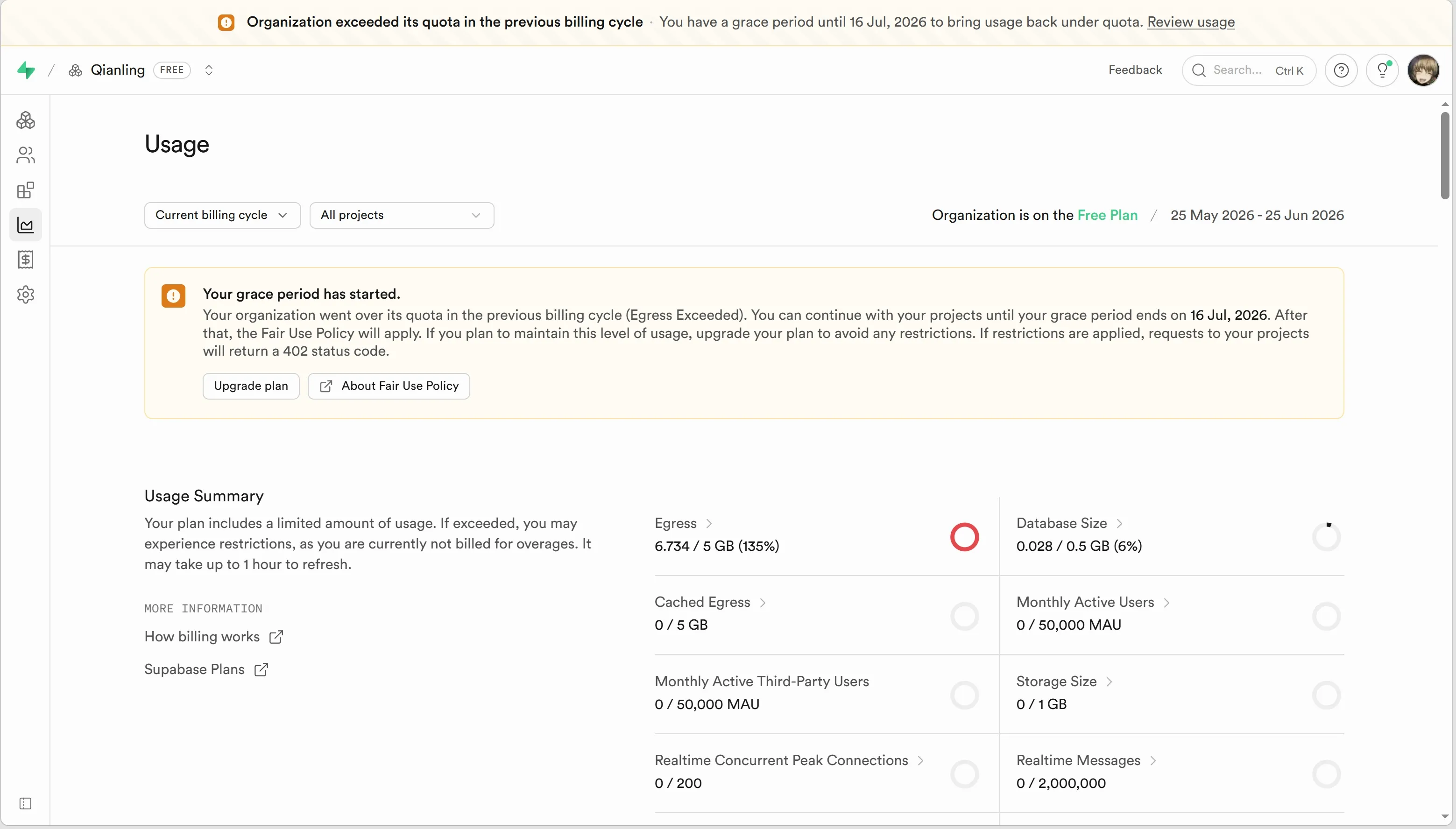
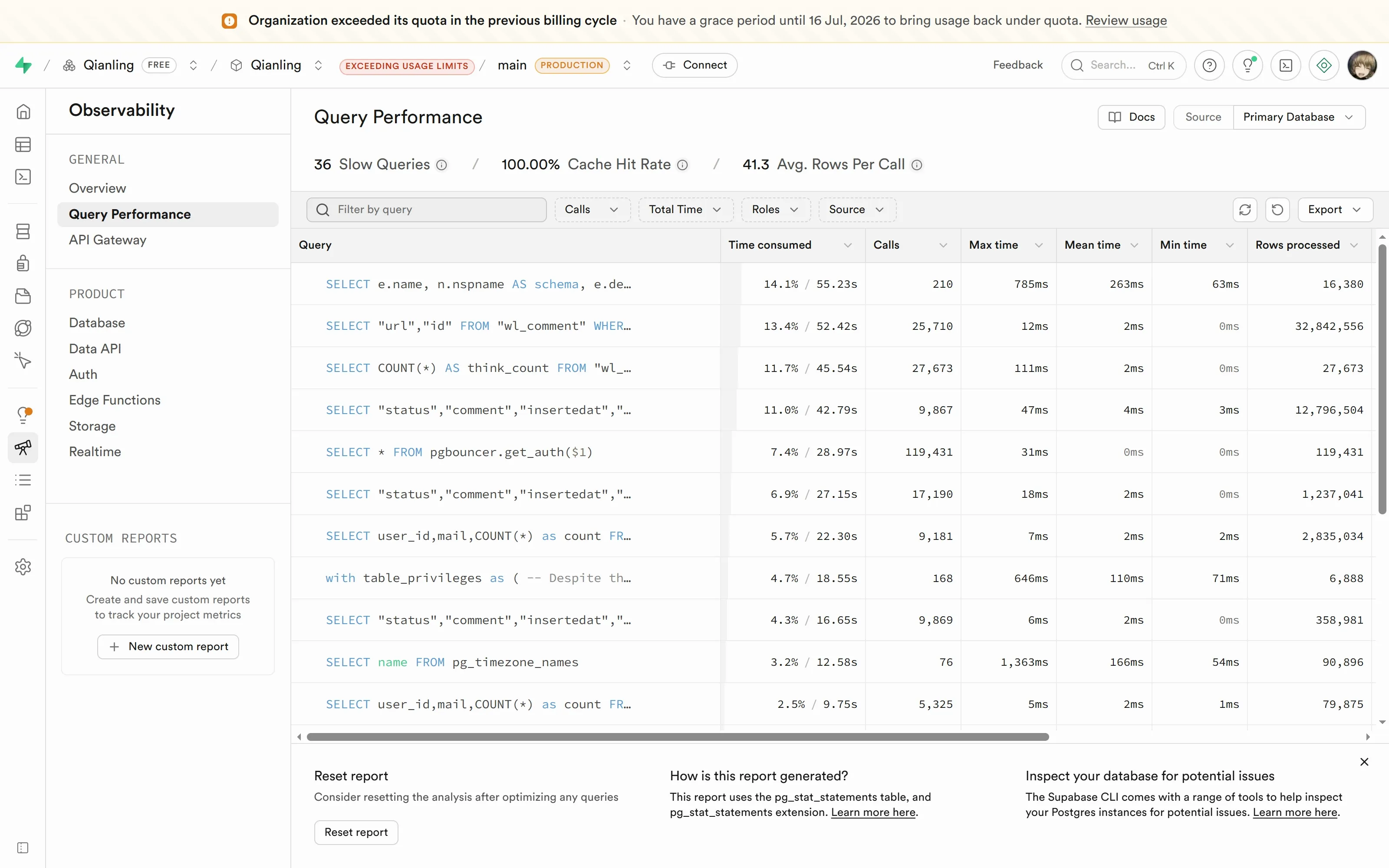
通过分析 Observability-Query Performance 发现:
wl_comment 表中最常用的查询(按 url 查找评论)每次执行需要全表扫描,单次扫描上千行,累计读取了数千万行数据。
7.4.1 客户端懒加载#
通过分析 Waline 客户端源码(@waline/client 的 slim.js),发现 walineInit() 函数在初始化评论组件时,内部会同时触发三类 API 请求:
| 请求类型 | 对应 SQL 查询 | 累计 rows_read | 说明 |
|---|---|---|---|
commentCount() | SELECT COUNT(*) ... | ~2,801 | 轻量,仅返回数字 |
pageviewCount() | SELECT * FROM wl_counter | ~5,221 | 轻量,浏览量计数 |
getComment() | SELECT url,id ...(全量) | ~3,400,220 | 重量,拉取全部评论 ID |
getComment() | SELECT [13字段] ... WHERE rid IS NULL | ~1,268,619 | 重量,拉取顶级评论 |
getComment() | SELECT [13字段] ... | ~104,379 | 重量,拉取全部评论 |
getUserList() | SELECT ... GROUP BY user_id,mail | ~245,870 | 重量,用户评论数统计 |
原主题在 Comment.astro 的 connectedCallback() 中直接调用 walineInit(),页面加载时立即触发以上全部请求。对于有 3647 条评论的热门文章,即使用户只看了标题就离开,也会产生约 1.4MB 的 Egress 流量。
优化思路:将轻量的计数查询(commentCount + pageviewCount)与重量级的评论列表加载(walineInit)分离。计数查询立即执行(文章顶部的浏览量/评论数需要即时显示),评论列表改为通过 IntersectionObserver 懒加载,只有当用户滚动到评论区附近的 200px 范围内时才初始化。
优化效果:Supabase Egress 从日均 300 MB 降低至 90 MB,降幅 70%,同时 Vercel Fluid Active CPU 从日均 16 m 降低至 7 m。
以下是修改 Prompt:
# Waline Comment Lazy Loading

- **File**: `src/components/waline/Comment.astro`
- **Goal**: Reduce Supabase egress traffic by only loading comments when user scrolls to the comment section
- **Reason**: Waline's `connectedCallback` immediately calls `walineInit()` on page hydration, triggering all API requests (comment list, count, pageview) even if the user never scrolls to the bottom comment area. For articles with many comments (e.g., 3647 comments), this generates ~1.4MB egress per visit regardless of user engagement.

## Changes

1. **Extracted `initWaline()` method**
   - Moved `walineInit()` call and Vue flag setup from `connectedCallback()` into a private `initWaline()` method
2. **Added `initialized` flag**
   - Private field `initialized = false` prevents duplicate initialization
   - `initWaline()` returns early if already initialized
3. **Added IntersectionObserver lazy loading**
   - In `connectedCallback()`, creates `IntersectionObserver` targeting `#waline` element
   - `rootMargin: '200px'` triggers initialization when user scrolls within 200px of the comment area
   - Observer auto-`disconnect()` after first intersection
4. **Added fallback for unsupported browsers**
   - Uses `typeof IntersectionObserver !== 'undefined'` check (not `'IntersectionObserver' in window`, which causes TypeScript to narrow `window` to `never` in the `else` branch since `IntersectionObserver` is part of standard `Window` type)
   - Fallback: `setTimeout(() => this.initWaline(), 800)` for browsers without IntersectionObserver support
5. **Edge case: `#waline` element not found**
   - If `querySelector('#waline')` returns null, falls back to immediate `initWaline()` call
6. **Separated lightweight counts from heavy comment loading**
   - Added `loadCounts()` method that immediately calls `commentCount()` and `pageviewCount()` from `@waline/client`
   - These populate the top-of-article `.waline-comment-count` and `.waline-pageview-count` spans with lightweight COUNT queries
   - In `walineInit()`, set `pageview: false` and `comment: false` to prevent duplicate API calls
   - Respects `additionalConfigs.comment` / `additionalConfigs.pageview` values (boolean or custom selector string)
   - Preserves localhost exclusion for pageview tracking

## Expected Impact

- Top-of-article view count and comment count load immediately (lightweight API calls)
- Full comment section (form + list) loads lazily only when user scrolls near it
- Reduces ~30-70% of Waline API calls (visitors who don't scroll to comments no longer trigger heavy comment list queries)
- No impact on comment functionality (submit, reply, like, delete) — same `walineInit()` parameters except `pageview`/`comment` disabled (handled separately)7.4.2 服务端查询优化#
根据 waline/packages/server/src/controller/comment.js 第 426-439 行的注释 112b46c ↗,Waline 为了减少 Serverless 环境下的 HTTP 请求次数,防止超过 LeanCloud 的免费额度,当评论大于 1000 条时,会直接从数据库拉取所有评论,然后用 JS 的 .slice() 在内存里切片分页,导致单次请求的 Egress 极高。
我已提交 Issue:[Bug]: PostgreSQL (Supabase) 极高的数据 Egress 流量 || [Bug]: PostgreSQL (Supabase) extremely high data egress traffic #3678 ↗,待开发者优化。
7.5 Supabase 数据库索引优化(提升数据加载速度)#
在 Supabase 数据库中为 wl_comment 和 wl_counter 表创建复合索引,使数据库能够通过 B-Tree 索引直接定位数据,避免全表扫描,从而减少查询时间和数据库负载。
打开 Supabase 的 SQL Editor,逐条执行以下 SQL 语句:
-- 1. 优化评论列表查询(最核心优化)
CREATE INDEX CONCURRENTLY IF NOT EXISTS idx_wl_comment_url_status_insertedat
ON "public"."wl_comment" ("url", "status", "insertedat" DESC);

-- 2. 优化带父级 ID (rid) 的查询
CREATE INDEX CONCURRENTLY IF NOT EXISTS idx_wl_comment_url_status_rid
ON "public"."wl_comment" ("url", "status", "rid");

-- 3. 优化计数器查询
CREATE INDEX CONCURRENTLY IF NOT EXISTS idx_wl_counter_url
ON "public"."wl_counter" ("url");

-- 4. 优化后台管理的分组查询
CREATE INDEX CONCURRENTLY IF NOT EXISTS idx_wl_comment_user_mail
ON "public"."wl_comment" ("status", "user_id", "mail");执行后预期返回:Success. No rows returned,表示索引已成功创建。
全部执行完毕后,运行以下查询,确认索引是否生效:
SELECT indexname, indexdef
FROM pg_indexes
WHERE tablename IN ('wl_comment', 'wl_counter');如果看到新创建的四个索引显示在结果中,就说明成功了:
- idx_wl_comment_url_status_insertedat
- idx_wl_comment_url_status_rid
- idx_wl_counter_url
- idx_wl_comment_user_mail
8. 移动端表格横向滚动修复(BUG修复)#
因 UnoCSS 的预设属性错误,当表格内容溢出手机屏幕后,无法左右滑动表格查看,我已提交 Issue:[bug] Tables in blog posts do not scroll horizontally on mobile devices #166 ↗,当前未修复。
以下是修改 Prompt:
# Mobile Table Horizontal Scrolling Fix

- **Goal**: Enable horizontal scrolling for tables on mobile devices when content overflows
- **Problem**: Tables had `display: block` in UnoCSS typography config, which prevented horizontal scrolling on narrow screens

## Changes

1. **Updated table style in UnoCSS config**
   - File: `uno.config.ts`
   - Line: 105
   - Changed: `table: { display: 'block', 'font-size': '.875em' }` → `table: { display: 'block', 'font-size': '.875em', 'overflow-x': 'auto' }`
   - Detail: Added `overflow-x: auto` to allow horizontal scrollbar when table width exceeds container width

## Usage

Tables in blog posts will now display a horizontal scrollbar on mobile devices when their content is wider than the screen. Users can swipe left/right to view the full table content.9. 移除外部英文字体#
Astro 从外部加载 Satoshi 作为默认的英文字体,对于中文内容为主的博客来说可精简,以提高网站性能。
以下是修改 Prompt:
# Remove Satoshi Font

- **Goal**: Remove Satoshi font (loaded via Astro Font API from Fontshare) as it is not needed
- **Reason**: Satoshi was used as the global body font but is unnecessary; the site will fall back to system default sans-serif fonts

## Changes

1. **Removed font configuration**
   - File: `astro.config.ts`
   - Removed: `fonts` array containing Satoshi font definition (provider, name, cssVariable, styles, weights, subsets)
   - Removed: `fontProviders` from `astro/config` import (no longer used)
2. **Removed Font component and body style**
   - File: `src/components/BaseHead.astro`
   - Removed: `import { Font } from 'astro:assets'`
   - Removed: `<Font cssVariable='--font-satoshi' preload={[{ subset: 'latin', style: 'normal' }]} />`
   - Removed: `<style> body { font-family: var(--font-satoshi); } </style>`
- Note: Caveat font preload `<link>` is preserved10. 增加 Vercount 站点计数#
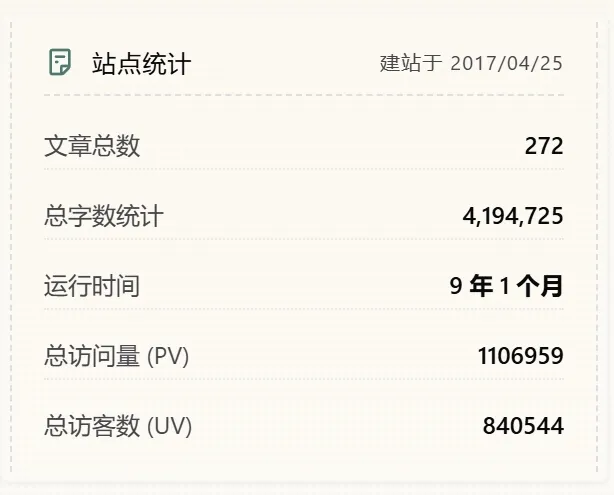
为了统计网站访问量,我本想使用 busuanzi ↗,但在 Astro 中存在重复统计数据问题:载入一次网页记录多次 PV。
故改用 Vercount ↗ 并在首页配置了站点统计卡片以展示数据。
BUG:Vercount 在较老浏览器中,如 iOS 15.4 的 Safari 上无法加载数据,我特别做了兜底修复。
以下是修改 Prompt:
# Homepage Site Statistics (Vercount)

- **Goal**: Add a site statistics card to the homepage showing article count, word count, site age, PV, and UV, inspired by `catcodeme.github.io-astro-pure-v4_0_3`

## Changes

1. **Created utility functions**
   - Created: `src/components/home/utils.ts`
   - Contains:
     - `calculateSiteAge(startDate)` — computes site age from a given start date, returns formatted string like `9 年 4 个月`
     - `getLatestPosts(limit)` — fetches latest blog posts sorted by date
     - `getTotalWords()` — counts total Chinese characters + English words across all posts
2. **Added Vercount script**
   - File: `src/layouts/BaseLayout.astro`
   - Change: Added the following script before `</body>`:
     ```html
     <script is:inline>
       window.addEventListener('load', () => {
         if ('requestIdleCallback' in window) {
           requestIdleCallback(() => {
             const script = document.createElement('script');
             script.src = 'https://events.vercount.one/js';
             script.async = true;
             document.body.appendChild(script);
           });
         }
       });
     </script>
     ```
   - Detail: Vercount is a lightweight site analytics service that auto-fills elements with matching IDs
3. **Updated homepage**
   - File: `src/pages/index.astro`
   - Added imports: `calculateSiteAge`, `getTotalWords` from `@/components/home/utils`
   - Added "Site Stats" section between "About" and "Posts" using receipt-style (dashed border) card design
   - Displays: Articles, Words, UpTime, ∑ PV (`id='vercount_value_site_pv'`), ∑ UV (`id='vercount_value_site_uv'`)
   - PV/UV values are loaded client-side by Vercount script; show "Loading" until populated
   - Site start date defaults to `2017-01-01` (adjustable in `calculateSiteAge()` call)
4. **Vercount Safari Compatibility Fix**
   - File: `src/layouts/BaseLayout.astro`
   - Goal: Fix PV/UV statistics not loading on Safari <17.4 (e.g., iOS Safari 15.4)
   - Reason: `requestIdleCallback` API is not supported in Safari until version 17.4; the original code's `if ('requestIdleCallback' in window)` check evaluates to `false` on older Safari, causing the Vercount script to never load
   - Change: Added `setTimeout` fallback when `requestIdleCallback` is unavailable
   - Detail:
     - Extracted Vercount script loading into a `loadVercount` function
     - Browsers with `requestIdleCallback` support continue to use it for idle-time loading
     - Browsers without support (Safari <17.4) fall back to `setTimeout(loadVercount, 1)`
- Ensures Vercount script loads on all browsers while preserving performance optimization on supported ones11. Google Analytics 轻量版#
注:我已弃用此方案,改用完整官方脚本,因 ga4mp 存在以下缺点:
- 缺少自动事件追踪,导致 Average engagement time per active user 等互动指标丢失统计;
- 用户维度数据收集不完整,导致访问数据失真,UV 混淆为 PV。
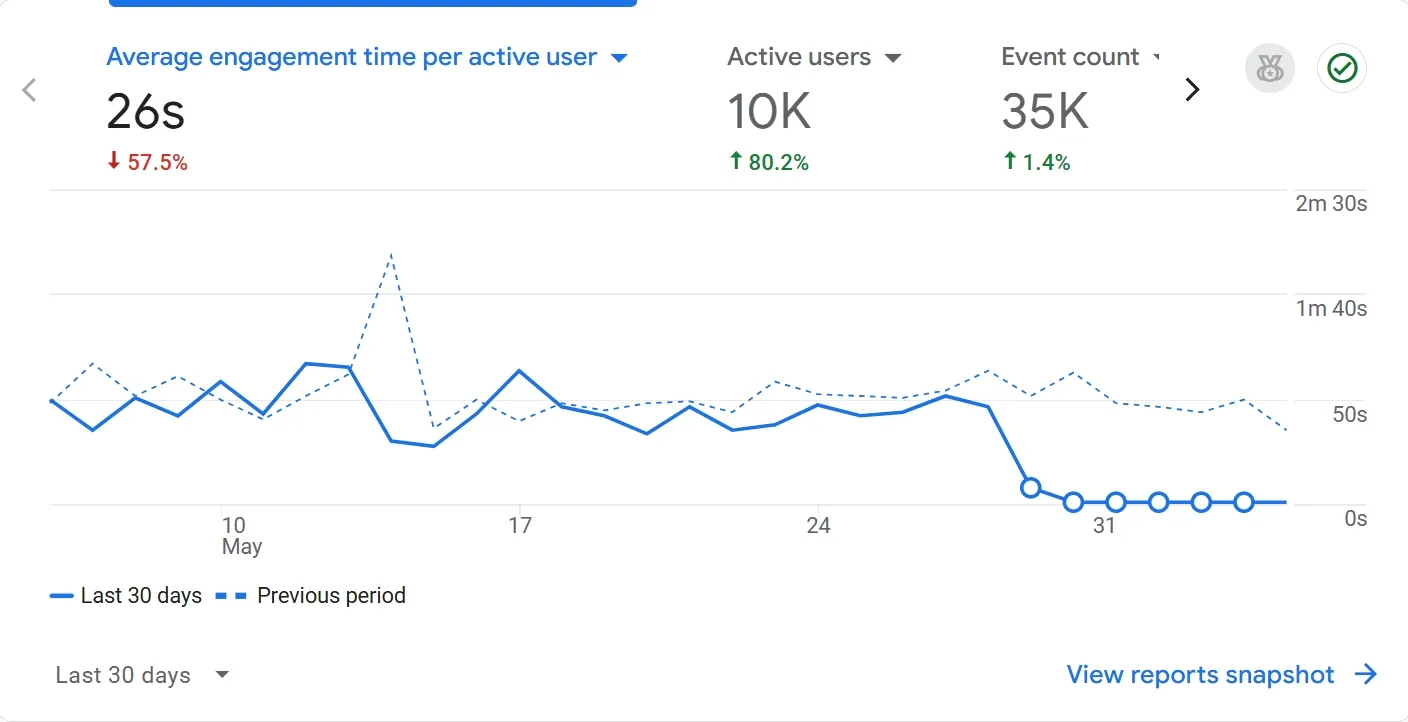
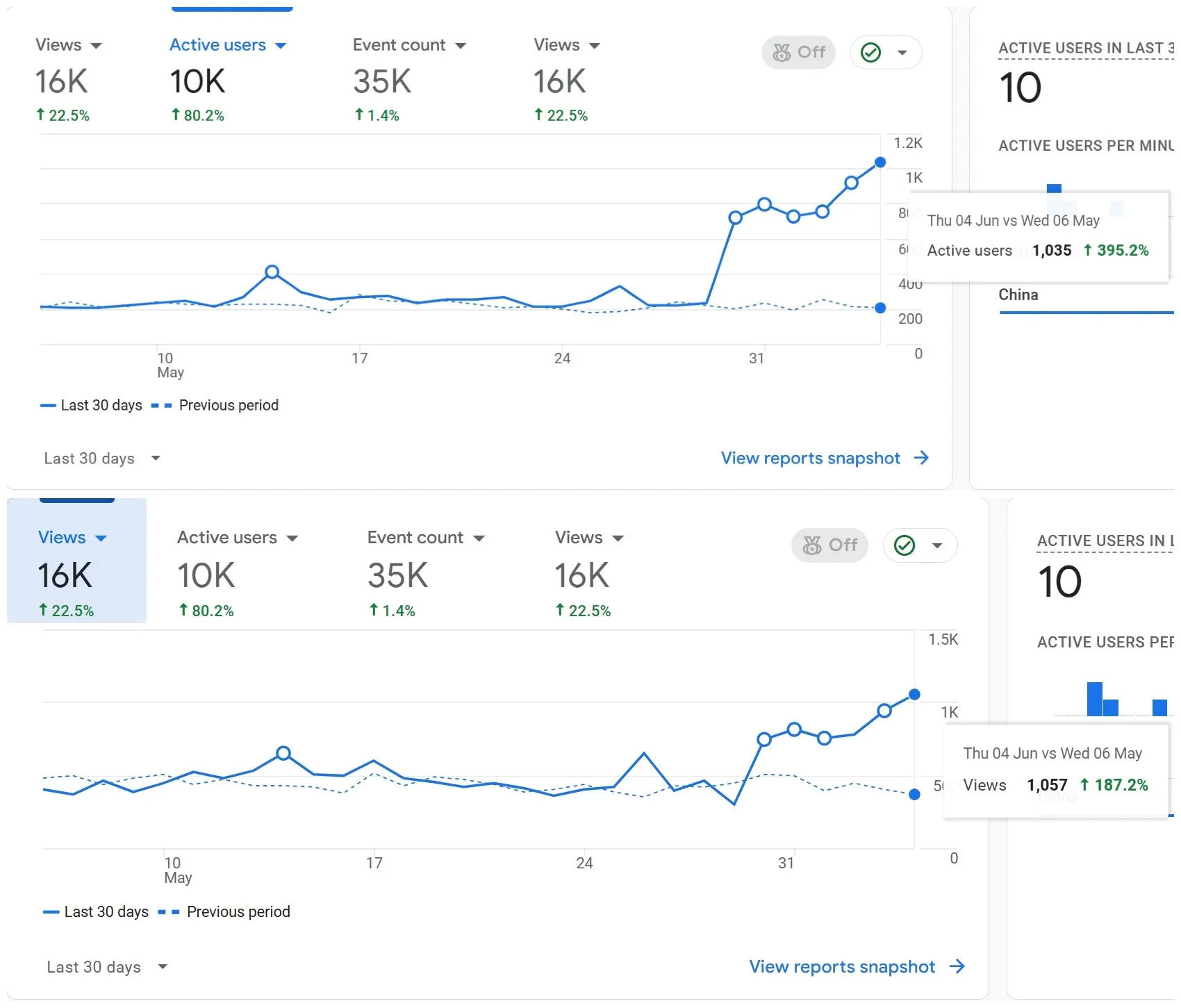
为了分析流量数据,博客引入了 Google Analytics,但官方脚本非常臃肿,高达 275.7 KB 且无法精简,脚本的大部分功能在个人博客上并未使用,拖慢页面加载速度。
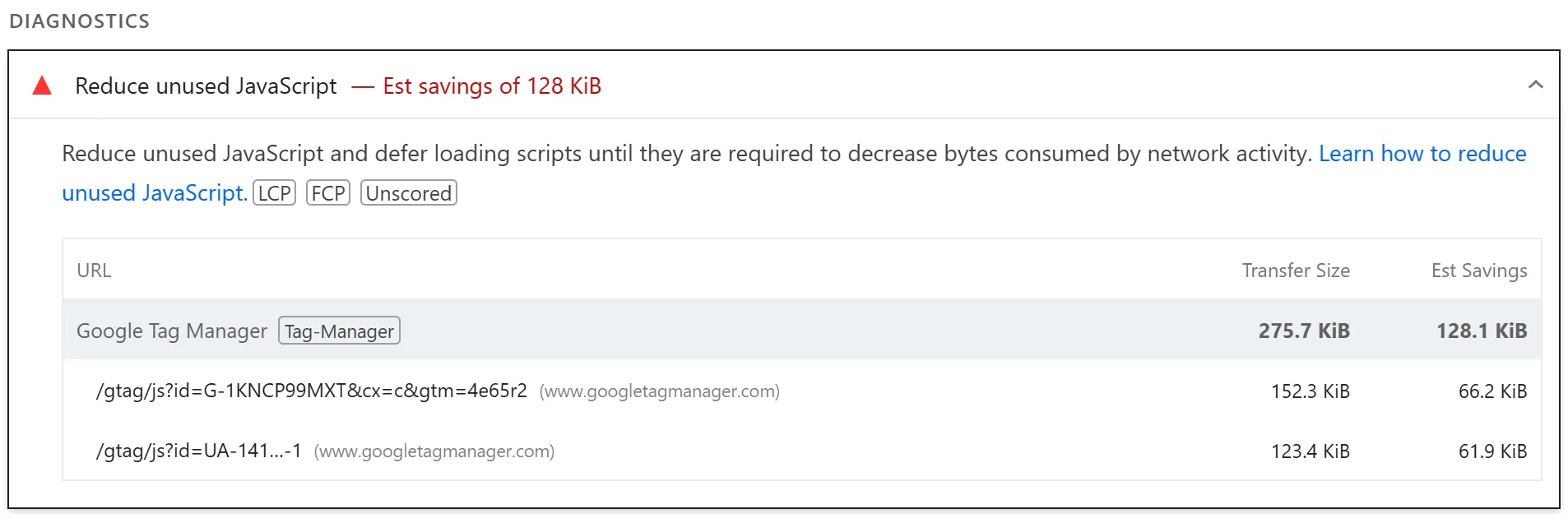
为此,改用极其轻量、大小仅 8.8 KB 的第三方脚本 GA4MP ↗。
以下是修改 Prompt:
# Google Analytics via ga4mp (Lazy Load)

- **File**: `src/layouts/BaseLayout.astro`
- **Goal**: Add Google Analytics with minimal Lighthouse performance impact
- **Reason**: Third-party analytics scripts block rendering and increase TBT; lazy loading after page idle minimizes the impact

## Changes

1. **Added Google Analytics (via ga4mp)**
   - ID: `G-1KNCP99MXT`
   - Library: `@analytics-debugger/ga4mp@0.0.8` (open-source GA4 Measurement Protocol, <4kb compressed, 95.6% lighter than gtag.js)
   - Script: `https://cdn.jsdelivr.net/npm/@analytics-debugger/ga4mp@0.0.8/dist/ga4mp.umd.min.js`
   - Strategy: `requestIdleCallback` (preferred) / `setTimeout(..., 500)` (fallback)
   - Sends `page_view` event via `ga4track.trackEvent('page_view')` after script loads
   - Uses `non_personalized_ads: true` for privacy compliance
2. **Loading priority**
- Vercount → Google Analytics12. 本地预览防数据污染#
为防止 Waline 文章浏览量统计、Vercount 访问量统计、Google Analytics 流量统计在本地调试时因频繁刷新页面导致数据虚高,我增加了本地开发环境过滤。
以下是修改 Prompt:
# Localhost exclusion
   - **Files**: `src/layouts/BaseLayout.astro`, `src/components/waline/Pageview.astro`, `src/components/waline/Comment.astro`
   - **Change**:
     - `BaseLayout.astro`: Added `if (location.hostname === 'localhost' || location.hostname === '127.0.0.1') return;` guard before loading Vercount and Google Analytics
     - `Pageview.astro`: Added same guard before loading Waline pageview count
     - `Comment.astro`: Added `pageview: location.hostname !== 'localhost' && location.hostname !== '127.0.0.1'` after `...walineConfig.additionalConfigs` spread to override `pageview: true` from config
- **Detail**: Waline pageview has two entry points — standalone `Pageview.astro` script and `walineInit` in `Comment.astro` (which reads `pageview: true` from `additionalConfigs`). The `pageview` key must be placed **after** the spread to avoid being overridden by `additionalConfigs.pageview: true`13. 国内 DNS 加速(仅 Cloudflare Pages 需要)#
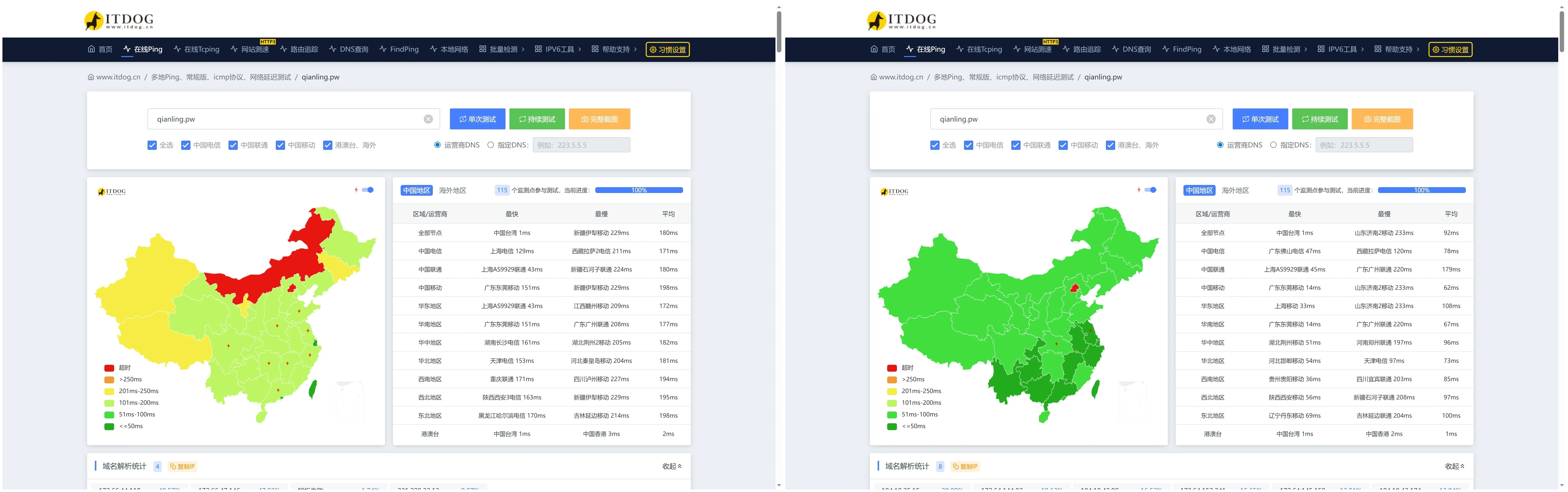
因博客访问量太大,我选择托管在不限流量的 Cloudflare Pages 上,但域名解析也被迫转交给了 Cloudflare,国内访客被分配到延迟高的美国节点。
我参考了这篇教程的 Worker 路由反代方案(日请求量需<10万),成功把延迟从 180ms 降低到了 90ms 左右:试试Cloudflare IP优选!让Cloudflare在国内再也不是减速器! ↗。
14. 修复旧版浏览器丢失文章样式问题(可选)#
因 UnoCSS 的这个问题:CSS Nesting syntax introduced in unocss@66.5 preset-typography breaks compatibility with older browsers #4971 ↗。
在不支持 CSS 原生嵌套的较老浏览器上,无法解析 UnoCSS 生成的嵌套 CSS 导致文章丢失样式。
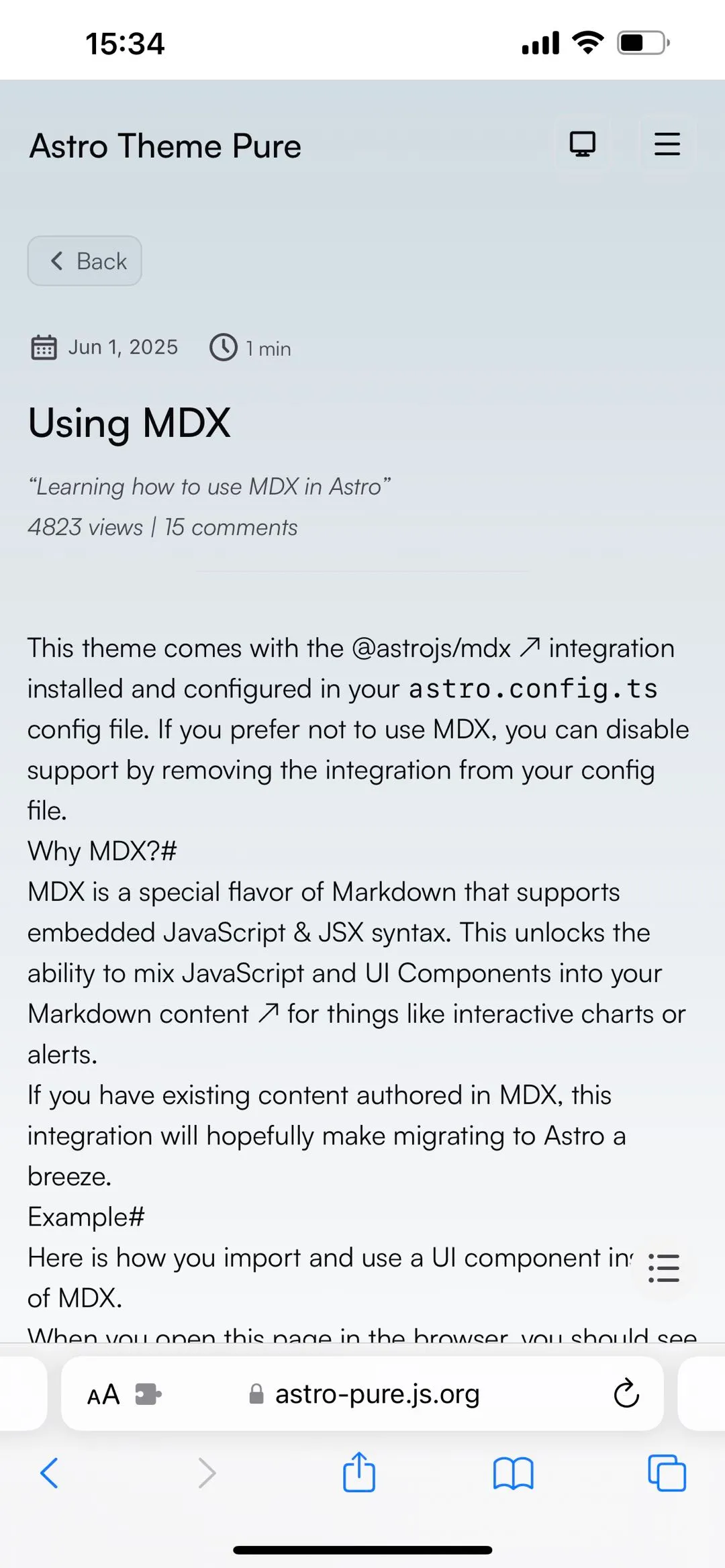
以下是修改 Prompt:
# Fix Safari 15.4 Prose Styles (LightningCSS)

- **Goal**: Fix article content losing all typography styles on Safari 15.4 (mobile)
- **Reason**: UnoCSS v66.5+ `preset-typography` generates native CSS nesting syntax, which Safari 15.4 does not support. This causes all `.prose` rules (headings, paragraphs, lists, blockquotes, etc.) to be silently ignored. See [unocss/unocss#4971](https://github.com/unocss/unocss/issues/4971)
- **TODO**: Once UnoCSS merges [#5062](https://github.com/unocss/unocss/pull/5062) (adds `compatibility.nestable: false` option) or releases a fix, consider removing this workaround and using the upstream solution instead

## Changes

1. **Added LightningCSS transformer**
   - File: `astro.config.ts`
   - Change: Added `vite: { css: { transformer: 'lightningcss' } }` to `defineConfig`
   - Effect: Vite uses LightningCSS to flatten nested CSS output from UnoCSS into flat selectors, compatible with older browsers
2. **Installed `lightningcss` dependency**
- Command: `npm install lightningcss --legacy-peer-deps`15. 标签保留原始大小写#
主题默认对所有标签执行 toLowerCase(),导致英文标签如 AI、Excel、iOS 全部变成小写 ai、excel、ios,不利于辨识。
以下是修改 Prompt:
# Preserve Tag Case (Remove toLowerCase)

- **File**: `src/content.config.ts`
- **Goal**: Preserve original case of tags (e.g., `AI`, `Excel`) instead of converting to lowercase
- **Reason**: Default `removeDupsAndLowerCase` transform calls `str.toLowerCase()` on every tag, causing English tags like `AI` to become `ai`
- **Change**: Renamed `removeDupsAndLowerCase` to `removeDups`, removed `.toLowerCase()` call, kept dedup via `Set`
- **Detail**:
  - Before: `const lowercaseItems = array.map((str) => str.toLowerCase())`
  - After: `return Array.from(new Set(array))`
  - Schema updated: `.transform(removeDupsAndLowerCase)` → `.transform(removeDups)`