笔者工作中常需分享演示文稿给国外同事,在此分享我的快速翻译流程。
1. 提取PPT内容#
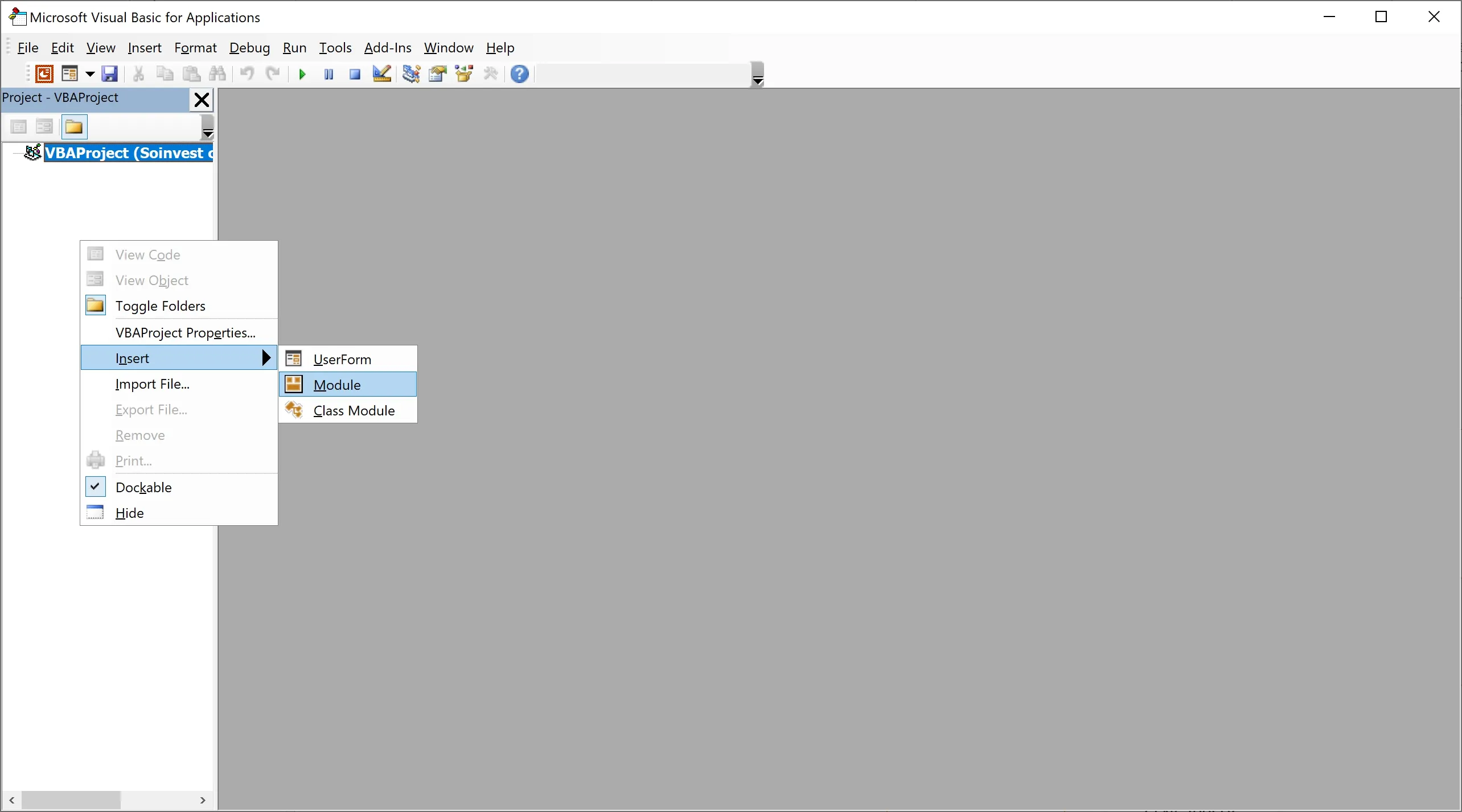
在 PowerPoint 中,按下 Alt + F11 打开 VBA 编辑器,右键新建模块,粘贴以下代码,点击运行按钮
Sub ExportText()
  Dim oPres As Presentation
  Dim oSlides As Slides
  Dim oSld As Slide         'Slide Object
  Dim oShp As Shape         'Shape Object
  Dim iFile As Integer      'File handle for output
  iFile = FreeFile          'Get a free file number
  Dim PathSep As String
  Dim FileNum As Integer
  Dim sTempString As String
  Dim fd() As String

  #If Mac Then
    PathSep = "/"
  #Else
    PathSep = "\"
  #End If

  fd = Split(FileDialogOpen, vbLf)
  If Left(fd(0), 1) = "-" Then
    Debug.Print "Canceled"
    Exit Sub
  End If

  For n = LBound(fd) To UBound(fd)
    Set oPres = Presentations.Open(FileName:=fd(n), ReadOnly:=msoTrue, WithWindow:=msoTrue)
    Set oSlides = oPres.Slides

    FileNum = FreeFile

    'Open output file
    ' NOTE:  errors here if file hasn't been saved
    Open oPres.Path & PathSep & oPres.Name & ".txt" For Output As FileNum

    num_slides = oPres.Slides.Count

    For i = 1 To num_slides
      Set oSld = oPres.Slides(i)
      Print #iFile, "Slide:" & vbTab & CStr(oSld.SlideNumber)
      For Each oShp In oSld.Shapes
        'Check to see if shape has a text frame and text
        If oShp.HasTextFrame And oShp.TextFrame.HasText Then
          If oShp.Type = msoPlaceholder Then
            Select Case oShp.PlaceholderFormat.Type
              Case Is = ppPlaceholderTitle, ppPlaceholderCenterTitle
                Print #iFile, "标题:" & vbTab & oShp.TextFrame.TextRange
              Case Is = ppPlaceholderBody
                Print #iFile, "正文:" & vbTab & oShp.TextFrame.TextRange
              Case Is = ppPlaceholderSubtitle
                Print #iFile, "副标题:" & vbTab & oShp.TextFrame.TextRange
              Case Else
                Print #iFile, "其他占位符:" & vbTab & oShp.TextFrame.TextRange
            End Select
          Else
            Print #iFile, vbTab & oShp.TextFrame.TextRange
          End If  ' msoPlaceholder
        Else  ' it doesn't have a textframe - it might be a group that contains text so:
          If oShp.Type = msoGroup Then
            sTempString = TextFromGroupShape(oShp)
            If Len(sTempString) > 0 Then
              Print #iFile, sTempString
            End If
          ElseIf oShp.Type = msoSmartArt Then
            sTempString = TextFromSmartArtNode(oShp.SmartArt.Nodes, 0)
            If Len(sTempString) > 0 Then
              Print #iFile, sTempString
            End If
          End If
        End If    ' Has text frame/Has text
      Next oShp

      Print #iFile, vbCrLf
    Next i
    Close #iFile
    oPres.Close
  Next n

  MsgBox "已处理 " & UBound(fd) - LBound(fd) + 1 & " 个文件"
End Sub

Function TextFromGroupShape(oSh As Shape) As String
' Returns the text from the shapes in a group
' and recursively, text within shapes within groups within groups etc.

  Dim oGpSh As Shape
  Dim sTempText As String

  If oSh.Type = msoGroup Then
    For Each oGpSh In oSh.GroupItems
      With oGpSh
        If .Type = msoGroup Then
          sTempText = sTempText & TextFromGroupShape(oGpSh)
        Else
          If .HasTextFrame Then
            If .TextFrame.HasText Then
              sTempText = sTempText & "(Gp:) " & .TextFrame.TextRange.Text & vbCrLf
            End If
          End If
        End If
      End With
    Next
  End If

  TextFromGroupShape = sTempText

NormalExit:
  Exit Function

Errorhandler:
  Resume Next

End Function


Function TextFromSmartArtNode(oSh As SmartArtNodes, depth As Long) As String
' Returns the text from the shapes in a SmartArt shape recursively

    Dim sTempText As String
    For i = 1 To oSh.Count
        With oSh(i)
            If .TextFrame2.TextRange.Text <> "" Then
                If depth = 0 Then
                    sTempText = sTempText & "(SmartArt:)" & .TextFrame2.TextRange & vbCrLf
                Else
                    sTempText = sTempText & Space(depth * 4) & .TextFrame2.TextRange & vbCrLf
                End If
                sTempText = sTempText & TextFromSmartArtNode(.Nodes, depth + 1)
            End If
        End With
    Next i

    TextFromSmartArtNode = sTempText

End Function


Function FileDialogOpen() As String

  #If Mac Then
    ' 默认路径
    mypath = MacScript("return (path to desktop folder) as String")

    sMacScript = "set applescript's text item delimiters to "","" " & vbNewLine & _
    "try " & vbNewLine & _
    "set theFiles to (choose file of type {""ppt"", ""pptx""}" & _
    "with prompt ""请选择要处理的一个或多个 PowerPoint 文档"" default location alias """ & _
    mypath & """ multiple selections allowed true)" & vbNewLine & _
    "set applescript's text item delimiters to """" " & vbNewLine & _
    "on error errStr number errorNumber" & vbNewLine & _
    "return errorNumber " & vbNewLine & _
    "end try " & vbNewLine & _
    "repeat with i from 1 to length of theFiles" & vbNewLine & _
    "if i = 1 then" & vbNewLine & _
    "set fpath to POSIX path of item i of theFiles" & vbNewLine & _
    "else" & vbNewLine & _
    "set fpath to fpath & """ & vbNewLine & _
    """ & POSIX path of item i of theFiles" & vbNewLine & _
    "end if" & vbNewLine & _
    "end repeat" & vbNewLine & _
    "return fpath"

    FileDialogOpen = MacScript(sMacScript)

  #Else
    With Application.FileDialog(msoFileDialogOpen)
      .AllowMultiSelect = True
      .Title = "请选择要处理的一个或多个 PowerPoint 文档"
      .Filters.Add "PowerPoint 文档", "*.ppt; *.pptx", 1
      If .Show = -1 Then
        FileDialogOpen = ""
        For i = 1 To .SelectedItems.Count
          If i = 1 Then
            FileDialogOpen = .SelectedItems.Item(i)
          Else
            FileDialogOpen = FileDialogOpen & vbLf & .SelectedItems.Item(i)
          End If
        Next
      Else
        FileDialogOpen = "-"
      End If
    End With

  #End If
End Function代码来自:「怎样批量提取 PPT 中多个文本框里的文字? - Emrys的回答 - 知乎 ↗」
2. AI生成VBA翻译代码#
提示词模板:
我需要将以下PPT文本翻译为[目标语言],并生成VBA导入代码。

以下是待翻译内容:
[粘贴.txt内容]运行宏#
在 PowerPoint 中,按下 Alt + F11 打开 VBA 编辑器,右键新建模块,粘贴 AI 生成的代码,点击运行按钮即可,翻译完成后需手动删除 VBA 模块,以免保存文件时报错。