~o( =∩ω∩= )m
1. 设定自定义文件#
打开 \blog\_config.next.yml
添加
custom_file_path:
  header: source/_data/header.njk
  sidebar: source/_data/sidebar.njk
  variable: source/_data/variables.styl
  mixin: source/_data/mixins.styl
style: source/_data/styles.styl打开文件夹 \blog\source
新建文件夹 _data
在 _data 文件夹内新建文件 header.njk、sidebar.njk、variables.styl、mixins.styl、styles.styl
2. CNPM#
本节参考自 淘宝 NPM 镜像
这是一个完整 npmjs.org 镜像,你可以用此代替官方版本(只读),同步频率目前为 10 分钟 一次以保证尽量与官方服务器同步。
在 npm 无法同步时提供帮助。
打开命令行窗口
安装 npm install -g cnpm --registry=https://registry.npm.taobao.org
指令
# 安装模块
从 registry.npm.taobao.org ↗ 安装所有模块。当安装的时候发现安装的模块还没有同步过来,淘宝 NPM 会自动在后台进行同步,并且会让你从官方 NPM registry.npm.taobao.org ↗ 进行安装。下次你再安装这个模块的时候,就会直接从 淘宝 NPM 安装了。
$ cnpm install [name]
# 同步模块
直接通过 sync 命令马上同步一个模块, 只有 cnpm 命令行才有此功能:
$ cnpm sync connect
当然, 你可以直接通过 web 方式来同步: /sync/connect
$ open https://npm.taobao.org/sync/connect
# 其它命令
支持 npm 除了 publish 之外的所有命令, 如:
$ cnpm info connect
3. Hexo 页面自动刷新#
本节参考自 MOxFIVE
经常本地调试 Hexo 主题, 如果有工具能监视文件更改幷自动刷新页面,那一定能提高不少效率,Browsersync 就是这样一款浏览器同步测试工具。
安装
在Hexo根目录下运行
npm install -g browser-sync
npm install hexo-browsersync --save安装后像往常一样执行 hexo s 开启本地服务器,当相关文件被修改或者保存时,关联的浏览器页面会自带刷新
不足
- 变动后将重新加载整个页面,不能局部刷新
- 使用 Hexo 自带服务器时,无法在移动端调试
- md 文件过大时界面无法加载
4. InstantClick#
本节参考自 刘兴刚博客
Next 主题 现已集成 quicklink
通常,我们为了减少 DNS 的查询时间,使用 dns prefetch 为该页面中的链接做解析,提升页面的加载速度。类似的,我们可以在鼠标滑到链接上到点击的时间间隙去加载这个页面,通常这个间隙有几百毫秒,利用 InstantClick,我们可以充分利用这几百毫秒,让网站能够瞬间显示新页面,几乎没有延迟。
但是 InstantClick 并不能滥用,许多 js 无法与它兼容,如谷歌分析、百度统计以及 fancybox。
初始化并解决部分 js 无法加载的问题:
打开 \hexo-theme-next\layout\_partials\head.njk
添加
<script src="\js\custom\instantclick.min.js" data-no-instant></script>
   <script data-no-instant>
   InstantClick.on('change', function(isInitialLoad) {
   if (isInitialLoad === false) {
     if (typeof MathJax !== 'undefined') // support MathJax
     MathJax.Hub.Queue(["Typeset",MathJax.Hub]);
     if (typeof prettyPrint !== 'undefined') // support google code prettify
     prettyPrint();
     if (typeof _hmt !== 'undefined')  // support 百度统计
     _hmt.push(['_trackPageview', location.pathname + location.search]);
     if (typeof ga !== 'undefined')  // support google analytics
       ga('send', 'pageview', location.pathname + location.search);
   }
   });
   InstantClick.init();
</script>打开 \hexo-theme-next\source\js\custom\
放置 instantclick.min.js
这时候对于所有链接都开启预加载模式,但可以把部分链接加入黑名单:
<a href="\blog\" data-no-instant>Blog</a>
5. 压缩#
5.1. Gulp#
本节参考自 蝉時雨
gulp.js 是基于流的自动化构建工具,我们可以使用 Gulp 为 Hexo 压缩文件
在 \blog\ 打开命令行窗口
安装
npm install gulp --save再根据需要安装以下模块
npm install gulp-minify-css --save
npm install gulp-uglify --save
npm install gulp-htmlmin --save
npm install gulp-htmlclean --save
npm install gulp-imagemin --save打开 \blog\
新建 gulpfile.js
添加
var gulp = require('gulp');
var minifycss = require('gulp-minify-css');
var uglify = require('gulp-uglify');
var htmlmin = require('gulp-htmlmin');
var htmlclean = require('gulp-htmlclean');
var imagemin = require('gulp-imagemin');

// 压缩html文件
gulp.task('minify-html', function() {
  return gulp.src('./public/**/*.html')
  .pipe(htmlclean())
  .pipe(htmlmin({
  removeComments: true,
  minifyJS: true,
  minifyCSS: true,
  minifyURLs: true,
  }))
  .pipe(gulp.dest('./public'))
});
// 压缩css文件
gulp.task('minify-css', function() {
  return gulp.src('./public/**/*.css')
  .pipe(minifycss())
  .pipe(gulp.dest('./public'));
});
// 压缩js文件
gulp.task('minify-js', function() {
  return gulp.src(['./public/**/.js','!./public/js/**/*min.js'])
  .pipe(uglify())
  .pipe(gulp.dest('./public'));
});
// 压缩 public/images 目录内图片
gulp.task('minify-images', function() {
  gulp.src('./public/images/**/*.*')
  .pipe(imagemin({
     optimizationLevel: 5, //类型:Number  默认:3  取值范围:0-7(优化等级)
     progressive: true, //类型:Boolean 默认:false 无损压缩jpg图片
     interlaced: false, //类型:Boolean 默认:false 隔行扫描gif进行渲染
     multipass: false, //类型:Boolean 默认:false 多次优化svg直到完全优化
  }))
  .pipe(gulp.dest('./public/uploads'));
});
// 默认任务 gulp 4.0 适用的方式
gulp.task('default', gulp.parallel('minify-html', 'minify-css', 'minify-js', 'minify-images'
 //build the website
));依照格式,删除未安装模块的代码部分
在命令行内输入 $ gulp 即可运行
一键同步代码参照 7. 批处理脚本自动创建文章及一键部署
把因删除空格缩小的间距调整回来:
打开 \blog\source\_data\styles.styl
添加
// gulp 间距调整
span.leancloud-visitors-count, span.post-comments-count.valine-comment-count {
  padding-left: 2px;
}
i.fa.fa-ravelry {
  padding-left: 5px;
}5.2. hexo-neat#
已知 BUG:
- 压缩 md 文件会使 markdown 语法的代码块消失
- 会删除全角空格
安装 npm install hexo-neat --save
打开 \blog\_config.yml
添加
# hexo-neat
# 开关
neat_enable: true
# 压缩 html
neat_html:
  enable: true
  exclude:
    - '**/*.md'
# 压缩 css
neat_css:
  enable: true
  exclude:
  - '**/*.min.css'
# 压缩 js
neat_js:
  enable: true
  mangle: true
  output:
  compress:
  exclude:
  - '**/*.min.js'
  - '**/jquery.fancybox.pack.js'
- '**/index.js'6. Service Worker#
Service workers 本质上充当 Web 应用程序与浏览器之间的代理服务器,为了适应越来越多的网页应用而产生。
它可以通过拦截并修改访问和资源请求,缓存特定的网页资源,并可以将网页做到离线可用;
同时 Service Workers 也能做到定期后台同步与信息推送。
部署成功后,您可以节省用户流量、提升页面二次加载速度等。
7. 批处理脚本自动创建文章及一键部署#
打开 \blog\
新建 新建文章.bat
添加
set "a=%date:~,4%"
set "b=%date:~5,2%"
set "c=%date:~8,2%"
hexo new "%a%-%b%-%c%"命名格式为 年-月-日.md
部署可写为 hexo clean & hexo g -d
若使用 gulp 则写为 hexo clean & hexo g && gulp & hexo deploy
8. 根据邮箱自定义评论头像#
来自 恶魔菌の记事簿 小姐姐的建议
打开 Gravatar:https://cn.gravatar.com/ ↗
注册并上传图片
之后即可在支持填写邮箱的评论插件中使用自己的头像啦
如果头像没有生效的话清除下网站缓存就行啦
9. 修改分类层级显示#
9.1. 修改 post.njk#
本节参考自 跬步

打开 \hexo-theme-next\layout\_macro\post.njk
查找
{{ __('symbol.comma') }}改为
{{ __('>') }}9.2. 修改 custom.styl#
本节参考自 孔晨皓
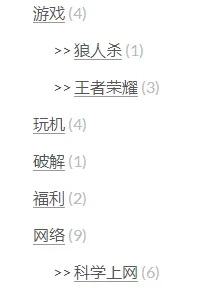
打开 \blog\source\_data\styles.styl
添加
.category-list ul {
  list-style: none;
  li:before {
    content: '>>';
  }
}10. 添加标题底部横线#
本节参考自 跬步
打开 \blog\source\_data\styles.styl
添加
h1, h2, h3, h4, h5, h6 {
  border-bottom: 2px solid #8c8c8c;
  padding: 0 5% 2px 0;
}11. 修改页脚文字#
本节参考自 RockZhou’s Blog
打开 \blog\source\_data\styles.styl
添加
// 底部字体
.footer {
  color: $fontColor;
  font-size: 16px;
  +mobile() {
    font-size: 12px;
  }
  .busuanzi-value {
    font-weight: bold;
  }
}12. 设置背景图片#
本节参考自 RockZhou’s Blog
打开 \blog\source\_data\styles.styl
添加
// 背景图片
body {
  background-image: url(/images/background.png);
  background-repeat: no-repeat;
  background-attachment: fixed;
  background-position: 50% 50%;
}13. 去除 #more 标签#
本节指导自 Moorez
打开 \hexo-theme-next\layout\_macro\post.njk
搜索 #more
删除即可
14. 记忆浏览位置#
本节参考自 Stack Overflow
关闭本页,重新打开,将返回刚才的浏览进度。
打开 \hexo-theme-next\source\js\custom\custom.js
添加
// 记忆浏览位置
$(function() {
  if (localStorage.tempScrollTop) {
    $(window).scrollTop(localStorage.tempScrollTop);
  }
});
$(window).on("scroll", function() {
  localStorage.setItem("tempScrollTop", $(window).scrollTop());
});
window.onbeforeunload = function() {
  var tempScrollTop = $(window).scrollTop();
  localStorage.setItem("tempScrollTop", tempScrollTop);
};15. 修改页宽#
本节参考自 [NexT]调整页面宽度
打开 \blog\source\_data\variables.styl
添加
$content-desktop                = 850px
$content-desktop-large          = 950px
$content-desktop-largest = 1100px数值改为百分比会导致在屏宽较小的显示器上,侧边栏打开时内容缩放,使得目录与文字不匹配。
16. 分类和标签界面显示年份#
本节参考自 reuixiv
Next 主题已自带该功能
16.1. 修改 category.njk#
打开 \hexo-theme-next\layout\category.njk
查找
  {% for post in page.posts %}
    {{ post_template.render(post) }}
{% endfor %}改为
  {% for post in page.posts %}
    {# Show year #}
    {% set year %}
    {% set post.year = date(post.date, 'YYYY') %}
    {% if post.year !== year %}
    {% set year = post.year %}
    <div class="collection-title">
      <h2 class="archive-year motion-element" id="archive-year-{{ year }}">{{ year }}</h2>
    </div>
    {% endif %}
    {# endshow #}
    {{ post_template.render(post) }}
{% endfor %}添加
{% block script_extra %}
  {% if theme.use_motion %}
  <script type="text/javascript" id="motion.page.archive">
    $('.archive-year').velocity('transition.slideLeftIn');
  </script>
  {% endif %}
{% endblock %}16.2. 修改 tag.njk#
打开 \hexo-theme-next\layout\tag.njk
查找
  {% for post in page.posts %}
    {{ post_template.render(post) }}
{% endfor %}改为
  {% for post in page.posts %}
    {# Show year #}
    {% set year %}
    {% set post.year = date(post.date, 'YYYY') %}
    {% if post.year !== year %}
    {% set year = post.year %}
    <div class="collection-title">
      <h2 class="archive-year motion-element" id="archive-year-{{ year }}">{{ year }}</h2>
    </div>
    {% endif %}
    {# endshow #}
    {{ post_template.render(post) }}
{% endfor %}添加
{% block script_extra %}
  {% if theme.use_motion %}
  <script type="text/javascript" id="motion.page.archive">
    $('.archive-year').velocity('transition.slideLeftIn');
  </script>
  {% endif %}
{% endblock %}17. 滚动条美化#
本节参考自 I sudo X
打开 \blog\source\_data\styles.styl
添加
::-webkit-scrollbar {
  width: 10px;
  height: 10px;
}
::-webkit-scrollbar-button {
  width: 0;
  height: 0;
}
::-webkit-scrollbar-button:start:increment,::-webkit-scrollbar-button:end:decrement {
  display: none;
}
::-webkit-scrollbar-corner {
  display: block;
}
::-webkit-scrollbar-thumb {
  border-radius: 8px;
  background-color: rgba(0,0,0,.2);
}
::-webkit-scrollbar-thumb:hover {
  border-radius: 8px;
  background-color: rgba(0,0,0,.5);
}
::-webkit-scrollbar-track,::-webkit-scrollbar-thumb {
  border-right: 1px solid transparent;
  border-left: 1px solid transparent;
}
::-webkit-scrollbar-track:hover {
  background-color: rgba(0,0,0,.15);
}
::-webkit-scrollbar-button:start {
  width: 10px;
  height: 10px;
  background: url(../images/scrollbar_arrow.png) no-repeat 0 0;
}
::-webkit-scrollbar-button:start:hover {
  background: url(../images/scrollbar_arrow.png) no-repeat -15px 0;
}
::-webkit-scrollbar-button:start:active {
  background: url(../images/scrollbar_arrow.png) no-repeat -30px 0;
}
::-webkit-scrollbar-button:end {
  width: 10px;
  height: 10px;
  background: url(../images/scrollbar_arrow.png) no-repeat 0 -18px;
}
::-webkit-scrollbar-button:end:hover {
  background: url(../images/scrollbar_arrow.png) no-repeat -15px -18px;
}
::-webkit-scrollbar-button:end:active {
  background: url(../images/scrollbar_arrow.png) no-repeat -30px -18px;
}18. 畅言加载优化#
本节参考自 刘兴刚博客
将畅言依赖的embed.js放至底部
打开 \hexo-theme-next\layout\_third-party\comments\changyan.njk
查找 document.getElementsByTagName("head")[0]
改为 document.getElementsByTagName("footer")[0]
19. 畅言去版权#
本节参考自 好基地
打开 \blog\source\_data\styles.styl
添加
#SOHUCS #SOHU_MAIN .module-cmt-notice{display:none !important;}
.section-service-w{display:none !important;}
#SOHUCS #SOHU_MAIN .module-cmt-box .post-wrap-w .post-wrap-main{background:none;background-image:url(https://i.loli.net/2017/08/05/5985668d58744.png) !important;}
#SOHUCS{position:relative;z-index:0 !important;}
#SOHUCS #SOHU_MAIN .changyan-login-dialog-wrapper .platform-login .split-hr{display:none !important;}
.phone-login{display:none !important;}
#SOHUCS #SOHU_MAIN .changyan-login-dialog-wrapper.changyan-login-dialog-wrapper-main{height:250px !important;}
#SOHUCS #SOHU_MAIN .changyan-login-dialog-wrapper .platform-login .login-group .login-item .login-logo-phone{display:none !important;}
#SOHUCS #SOHU_MAIN .changyan-login-dialog-wrapper .platform-login .login-instruction{display:none !important;}
#SOHUCS #SOHU_MAIN .changyan-login-dialog-wrapper .platform-login .login-group .login-item .login-logo-wechat{display:none !important;}
#SOHUCS #SOHU_MAIN .changyan-login-dialog-wrapper.changyan-login-dialog-wrapper-main{background:none;background-image:url(https://i.loli.net/2017/08/05/59856762568bb.png) !important;}
#SOHUCS #SOHU_MAIN .changyan-login-dialog-wrapper .cy-logo{background:none !important;}
#SOHUCS #SOHU_MAIN .module-cmt-box .post-wrap-w .wrap-action-w .action-issue-w .issue-btn-w a .btn-fw{background:none;background-image:url(https://i.loli.net/2017/08/05/5985612ad66f5.png) !important;}
#SOHUCS #SOHU_MAIN .module-cmt-footer .section-service-w, #SOHUCS #SOHU_MAIN .module-cmt-footer .section-service-w .service-wrap-w, #SOHUCS #SOHU_MAIN .module-cmt-footer .section-service-w .service-wrap-w a{height:0px !important;overflow:hidden !important;}20. 代码块复制功能#
本节参考自 猪猪娱乐
更新 Next 主题至 5.1.3 后失效,现已自带复制功能
20.1. 下载 clipboard.js#
任选其一
clipboard.min.js( 推荐)
打开 \hexo-theme-next\source\lib\
新建文件夹 zclip
放置 clipboard.js/clipboard.min.js
20.2. 插入 JavaScript#
打开 \hexo-theme-next\source\js\
新建 custom.js
添加
//此函数用于创建复制按钮
function createCopyBtns() {
  var $codeArea = $("figure table");
  //查看页面是否具有代码区域,没有代码块则不创建 复制按钮
  if ($codeArea.length > 0) {
    //复制成功后将要干的事情
    function changeToSuccess(item) {
       $imgOK = $("#copyBtn").find("#imgSuccess");
        if ($imgOK.css("display") == "none") {
          $imgOK.css({
            opacity: 0,
            display: "block"
          });
          $imgOK.animate({
            opacity: 1
          }, 1000);
          setTimeout(function() {
            $imgOK.animate({
              opacity: 0
            }, 2000);
          }, 2000);
          setTimeout(function() {
            $imgOK.css("display", "none");
          }, 4000);
        };
    };
    //创建 全局复制按钮,仅有一组。包含:复制按钮,复制成功响应按钮
    //值得注意的是:1.按钮默认隐藏,2.位置使用绝对位置 position: absolute; (position: fixed 也可以,需要修改代码)
    $(".post-body").before('<div id="copyBtn" style="opacity: 0; position: absolute;top:0px;display: none;line-height: 1; font-size:1.5em"><span id="imgCopy" ><i class="fa fa-paste fa-fw"></i></span><span id="imgSuccess" style="display: none;"><i class="fa fa-check-circle fa-fw" aria-hidden="true"></i></span>');
    //创建 复制 插件,绑定单机时间到 指定元素,支持JQuery
    var clipboard = new Clipboard('#copyBtn', {
      target: function() {
        //返回需要复制的元素内容
        return document.querySelector("[copyFlag]");
      },
      isSupported: function() {
        //支持复制内容
        return document.querySelector("[copyFlag]");
      }
    });
    //复制成功事件绑定
    clipboard.on('success',
      function(e) {
        //清除内容被选择状态
        e.clearSelection();
        changeToSuccess(e);
      });
    //复制失败绑定事件
    clipboard.on('error',
      function(e) {
        console.error('Action:', e.action);
        console.error('Trigger:', e.trigger);
      });
    //鼠标 在复制按钮上滑动和离开后渐变显示/隐藏效果
    $("#copyBtn").hover(
      function() {
        $(this).stop();
        $(this).css("opacity", 1);
      },
      function() {
        $(this).animate({
          opacity: 0
        }, 2000);
      }
    );
  }
}

//感应鼠标是否在代码区
$("figure").hover(
  function() {
    //-------鼠标活动在代码块内
    //移除之前含有复制标志代码块的 copyFlag
    $("[copyFlag]").removeAttr("copyFlag");
    //在新的(当前鼠标所在代码区)代码块插入标志:copyFlag
    $(this).find(".code").attr("copyFlag", 1);
    //获取复制按钮
    $copyBtn = $("#copyBtn");
    if ($copyBtn.lenght != 0) {
      //获取到按钮的前提下进行一下操作
      //停止按钮动画效果
      //设置为 显示状态
      //修改 复制按钮 位置到 当前代码块开始部位
      //设置代码块 左侧位置
      $copyBtn.stop();
      $copyBtn.css("opacity", 0.8);
      $copyBtn.css("display", "block");
      $copyBtn.css("top", parseInt($copyBtn.css("top")) + $(this).offset().top - $copyBtn.offset().top + 3);
      $copyBtn.css("left", -$copyBtn.width() - 3);
    }
  },
  function() {
    //-------鼠标离开代码块
    //设置复制按钮可见度 2秒内到 0
    $("#copyBtn").animate({
      opacity: 0
    }, 2000);
  }
);
//页面载入完成后,创建复制按钮
$(document).ready(function() {
  createCopyBtns();
});20.3. 引入自定义文件#
打开 \hexo-theme-next\layout\_custom\
新建 custom.njk
打开 \hexo-theme-next\layout\_layout.njk
在 </body> 前添加
{% include '_custom/custom.njk' %}20.4. 添加主题#
打开 \blog\source\_data\header.njk
添加
<script type="text/javascript" src="/lib/zclip/clipboard.min.js"></script>
<script type="text/javascript" src="/js/src/custom.js"></script>21. 文末结束标记#
本节参考自 务虚笔记
打开 \hexo-theme-next\layout\_macro\
新建 passage-end-tag.njk
添加
{% if theme.passage_end_tag.enabled %}
<div style="text-align:center;color: #ccc;font-size:15px;"><br><br><br>
-------------文章结束啦 ~\(≧▽≦)/~ 感谢您的阅读-------------</div>
<br>打开 \hexo-theme-next\layout\_macro\post.njk
查找 wechat
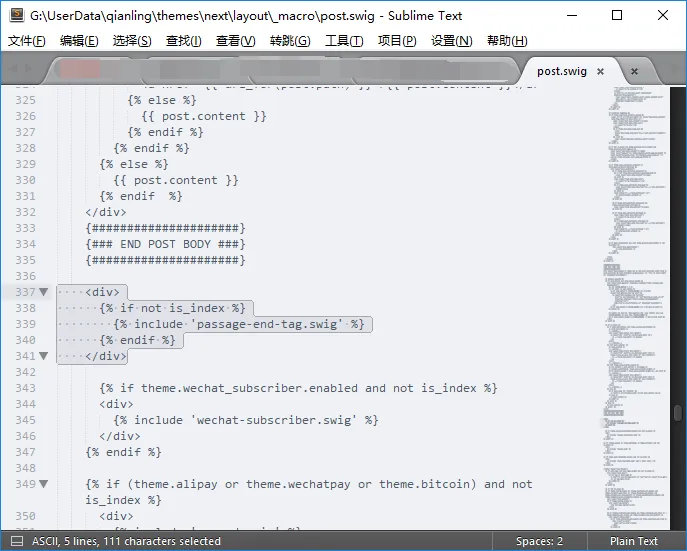
于图中位置添加
  <div>
  {% if not is_index %}
  {% include 'passage-end-tag.njk' %}
  {% endif %}
</div>打开 \hexo-theme-next\_config.yml
添加
# 文章末尾添加“本文结束”标记
passage_end_tag:
enabled: true22. 鼠标点击特效#
本节参考自 蝉時雨
打开 \blog\source\_data\header.njk
添加
<!-- 点击特效 -->
<canvas class="fireworks" style="position: fixed;left: 0;top: 0;z-index: 1; pointer-events: none;" ></canvas>
<script type="text/javascript" src="//cdn.bootcss.com/animejs/2.2.0/anime.min.js"></script>
<script type="text/javascript" src="/js/src/fireworks.js"></script>下载
放置 anime.min.js 至 CDN
打开 \hexo-theme-next\source\js\custom\
放置 fireworks.js
23. 侧边栏添加 APlayer#
本节参考自 蝉時雨
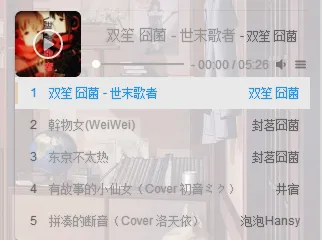
打开 \hexo-theme-next\source\js\custom\
放置 APlayer.min.js
打开 \blog\source\_data\sidebar.njk
添加
<div id="aplayer" class="aplayer"></div>
<script src="/js/src/custom/APlayer.min.js"></script>
<script type="text/javascript">
var ap = new APlayer({
  element: document.getElementById('aplayer'),         // Optional, player element
  narrow: false,         // Optional, narrow style
  autoplay: false,              // Optional, autoplay song(s), not supported by mobile browsers
  showlrc: 0,     // Optional, show lrc, can be 0, 1, 2, see: ###With lrc
  mutex: true,                 // Optional, pause other players when this player playing
  theme: '#e6d0b2',          // Optional, theme color, default: #b7daff
  mode: 'random',      // Optional, play mode, can be `random` `single` `circulation`(loop) `order`(no loop), default: `circulation`
  preload: 'metadata',               // Optional, the way to load music, can be 'none' 'metadata' 'auto', default: 'auto'
  listmaxheight: '513px',      // Optional, max height of play list
  music: [{
    title: '双笙 囧菌 - 世末歌者',
    author: '双笙 囧菌',
    url: 'https://qianling-1254036047.cos.ap-chengdu.myqcloud.com/music/%E5%8F%8C%E7%AC%99%20%E5%9B%A7%E8%8F%8C%20-%20%E4%B8%96%E6%9C%AB%E6%AD%8C%E8%80%85.mp3',
    pic: 'https://qianling-1254036047.cos.ap-chengdu.myqcloud.com/music/%E5%8F%8C%E7%AC%99%20%E5%9B%A7%E8%8F%8C%20-%20%E4%B8%96%E6%9C%AB%E6%AD%8C%E8%80%85.png',
  }, {
    title: '幹物女(WeiWei)',
    author: '封茗囧菌',
    url: 'https://qianling-1254036047.cos.ap-chengdu.myqcloud.com/music/%E5%B0%81%E8%8C%97%E5%9B%A7%E8%8F%8C%20-%20%E5%B9%B9%E7%89%A9%E5%A5%B3(WeiWei).mp3',
    pic: 'https://qianling-1254036047.cos.ap-chengdu.myqcloud.com/music/%E5%B0%81%E8%8C%97%E5%9B%A7%E8%8F%8C%20-%20%E5%B9%B9%E7%89%A9%E5%A5%B3(WeiWei).png',
  }]
  });
</script>24. 页面添加 live2d#
本节参考自 幻想帖
安装 npm install -save hexo-helper-live2d
打开 \blog\source\_data\header.njk
添加
{{ live2d() }}打开 \blog\_config.yml
添加
live2d:
  model: koharu
  width: 150
  height: 300
  scaling: 2
  mobileShow: true
  mobileScaling: 0.5
  opacityDefault: 1
  position: left
  horizontalOffset: 10
  verticalOffset: -40
  className: live2d
id: live2dcanvas25. 添加 Mob 分享#
本节参考自 Issue #911
登录 MOB(如无帐号请注册) http://mob.com/login/ ↗
添加新的应用,然后在添加产品处添加 ShareSDK
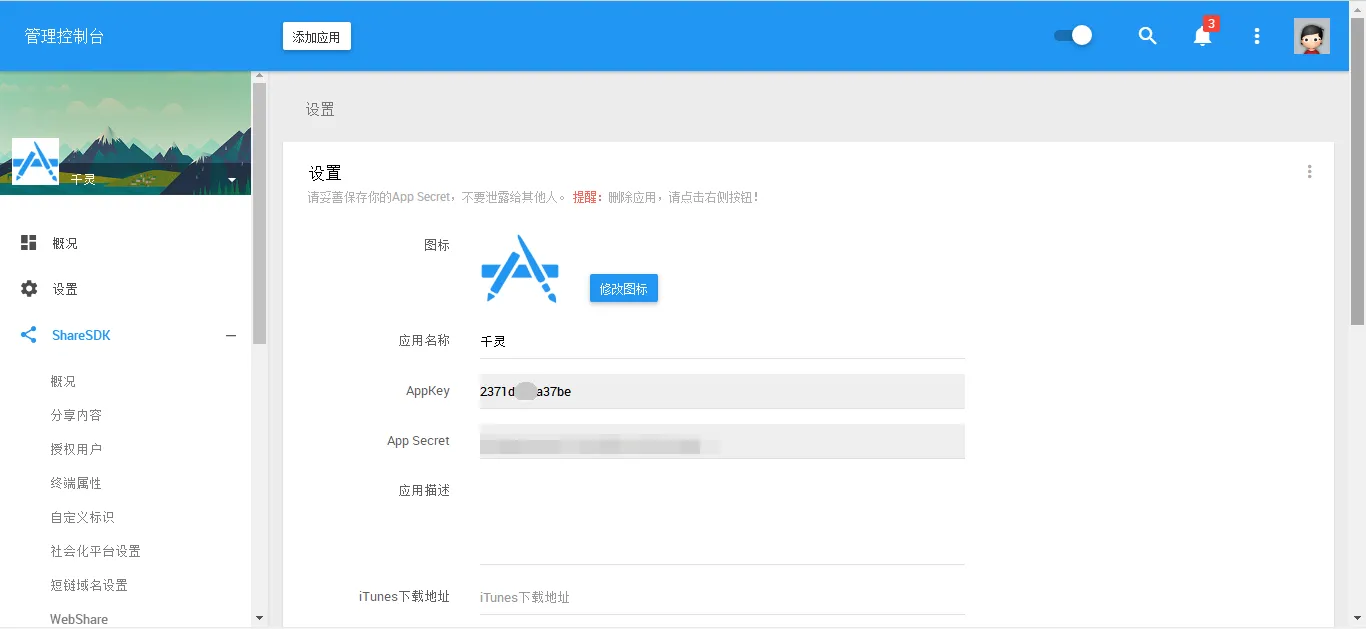
打开设置,复制AppKey
打开 \blog\_config.yml
添加
#Share
mob_share:
appkey: ******打开 \hexo-theme-next\layout\_partials\share\
新建 mob_share.njk
添加
<!--MOB SHARE BEGIN-->
<div class="-mob-share-ui-button -mob-share-open">分 享</div>
<div class="-mob-share-ui"  -mob-share-ui-theme -mob-share-ui-theme-slide-bottom style="display: none">
<ul class="-mob-share-list">
  <li class="-mob-share-weixin"><p>微信</p></li>
  <li class="-mob-share-qzone"><p>QQ空间</p></li>
  <li class="-mob-share-weibo"><p>新浪微博</p></li>
  <li class="-mob-share-facebook"><p>Facebook</p></li>
  <li class="-mob-share-twitter"><p>Twitter</p></li>
  <li class="-mob-share-pocket"><p>Pocket</p></li>
  <li class="-mob-share-tumblr"><p>Tumblr</p></li>
  <li class="-mob-share-google"><p>Google+</p></li>
  <li class="-mob-share-linkedin"><p>Linkedin</p></li>
  <li class="-mob-share-qq"><p>QQ好友</p></li>
  <li class="-mob-share-tencentweibo"><p>腾讯微博</p></li>
  <li class="-mob-share-renren"><p>人人网</p></li>
  <li class="-mob-share-douban"><p>豆瓣</p></li>
  <li class="-mob-share-youdao"><p>有道云笔记</p></li>
  <li class="-mob-share-instapaper"><p>Instapaper</p></li>
</ul>
<div class="-mob-share-close">取消</div>
</div>
<div class="-mob-share-ui-bg"></div>
<script id="-mob-share" src="https://f1.webshare.mob.com/code/mob-share.js?appkey={{config.mob_share.appkey}}"></script>
<!--MOB SHARE END-->打开 \hexo-theme-next\layout\_macro\post.njk
查找 <i class="fa fa-chevron-right">
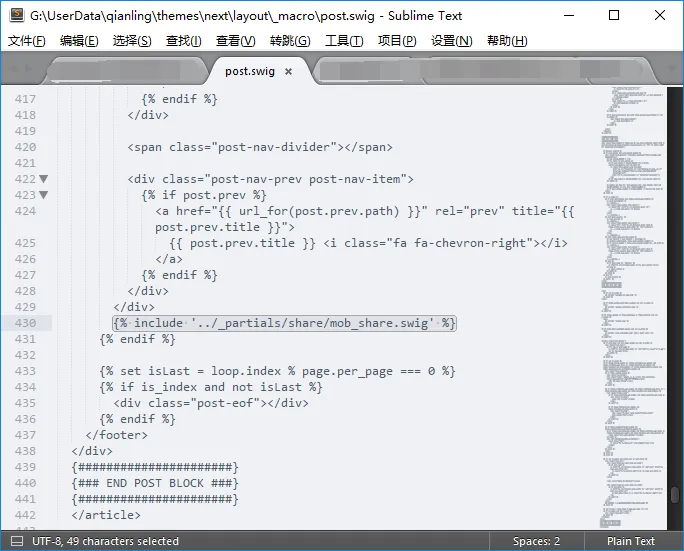
于图中位置添加
{% include '../_partials/share/mob_share.njk' %}26. 文章置顶#
本节参考自 Moorez
Next 主题已自带该功能
Bug:与按文章更新时间排序冲突
26.1. 修改 generator.js#
打开 \blog\node_modules\hexo-generator-index\lib\generator.js
将内容修改为
'use strict';
var pagination = require('hexo-pagination');
module.exports = function(locals){
  var config = this.config;
  var posts = locals.posts;
  posts.data = posts.data.sort(function(a, b) {
    if(a.sticky && b.sticky) { // 两篇文章sticky都有定义
      if(a.sticky == b.sticky) return b.date - a.date; // 若sticky值一样则按照文章日期降序排
      else return b.sticky - a.sticky; // 否则按照sticky值降序排
    }
    else if(a.sticky && !b.sticky) { // 以下是只有一篇文章sticky有定义,那么将有sticky的排在前面(这里用异或操作居然不行233)
      return -1;
    }
    else if(!a.sticky && b.sticky) {
      return 1;
    }
    else return b.date - a.date; // 都没定义按照文章日期降序排
  });
  var paginationDir = config.pagination_dir || 'page';
  return pagination('', posts, {
  perPage: config.index_generator.per_page,
  layout: ['index', 'archive'],
  format: paginationDir + '/%d/',
  data: {
    __index: true
  }
  });
};使用方法
在文章中添加 sticky 值,数值越大文章越靠前,如
---
title: Hexo 优化汇总
categories: 开发
tags:
  - 前端
  - Hexo
---26.2. 图标美化#
打开 \hexo-theme-next\layout\_macro\post.njk
查找(两条) <i class="fa fa-thumbtack"></i>
修改为想要的图形(以图片为例) <img src="/images/sticky.png" width="60" height="60" />
如果是图片,可能需要修改 CSS,以下为参考
// 文章置顶标签样式
.post-sticky-flag {
  position: absolute;
  right: 0px;
  bottom: 32px;
  pointer-events: none;
+mobile() {
  bottom: 38px;
  right: -25px;
  }
}
.post-sticky-flag {
  -ms-transform: rotate(0deg);
  transform: rotate(0deg);
}27. Local Search 加载动画修改#
Next 主题已自带预加载功能
打开 \hexo-theme-next\source\js\local-search.js
查找 fa fa-spinner fa-pulse fa-5x fa-fw
改为 fa fa-circle-o-notch fa-spin fa-5x fa-fw margin-bottom
28. Star rating 修改#
本节参考自 reuixiy
打开 \hexo-theme-next\layout\_partials\post\post-footer.njk
查找 <div class="wp_rating">
在下一行添加
<div style="color: rgba(0, 0, 0, 0.75); font-size:13px; letter-spacing:3px">(>来评分吧<)</div>
打开 \blog\source\_data\styles.styl
添加
// 评分留白更改
.post-widgets {
  padding-top: 0px;
}
.post-nav {
  margin-top: 30px;
}29. 点击侧栏以外区域时关闭侧栏#
本节参考自 Issue #947
Next 主题 7.0+ 已失效
打开 \hexo-theme-next\source\js\motion.js
添加
// 点击侧栏以外区域时关闭侧栏
$('body').on('click',function(e){
  var bSidebarShow = $('#sidebar').css('display')==='block' && $('#sidebar').width() > 0;
  var bFlag = $(e.target).parents('#sidebar,.sidebar-toggle').length > 0;
  if(bSidebarShow && !bFlag){
    $('.sidebar-toggle-line-wrap').trigger('click');
    e.preventDefault();
  }
});30. 阅读进度条#
本节参考自 I sudo X
比自带的更好看。
打开 \blog\source\_data\header.njk
添加
<div class="top-scroll-bar"></div>打开 \blog\source\_data\styles.styl
添加
//顶部阅读进度条
.top-scroll-bar {
  position: fixed;
  height: 3px;
  top: 0;
  left: 0;
  transition-duration: 0.7s,0.7s;
  transiton-property: width,background;
  z-index: 99999;
  display: none;
  background: #37C6C0;
}打开 \hexo-theme-next\source\js\custom\custom.js
添加
//阅读进度条
$(document).ready(function () {
  $(window).scroll(function(){
  $(".top-scroll-bar").attr("style", "width: " + ($(this).scrollTop() / ($(document).height() - $(this).height()) * 100) + "%; display: block;");
  var s=$(window).scrollTop();
  var a=$(document).height();
  var b=$(window).height();
  var result=parseInt(s/(a-b)*100);
  $(".top-scroll-bar").css("width",result+"%");
  if(result>=0&&result<=19)
  $(".top-scroll-bar").css("background","#cccccc");
  if(result>=20&&result<=39)
  $(".top-scroll-bar").css("background","#50bcb6");
  if(result>=40&&result<=59)
  $(".top-scroll-bar").css("background","#85c440");
  if(result>=60&&result<=79)
  $(".top-scroll-bar").css("background","#f2b63c");
  if(result>=80&&result<=99)
  $(".top-scroll-bar").css("background","#FF0000");
  if(result==100)
  $(".top-scroll-bar").css("background","#f58ca1");
  });
});31. 评论输入打字礼花及震动特效#
本节参考自 龙笑天下
将以下代码保存为 activate-power-mode.js
(function pngackUniversalModuleDefinition(root,factory){if(typeof exports==='object'&&typeof module==='object')module.exports=factory();else if(typeof define==='function'&&define.amd)define([],factory);else if(typeof exports==='object')exports["POWERMODE"]=factory();else root["POWERMODE"]=factory()})(this,function(){return(function(modules){var installedModules={};function __pngack_require__(moduleId){if(installedModules[moduleId])return installedModules[moduleId].exports;var module=installedModules[moduleId]={exports:{},id:moduleId,loaded:false};modules[moduleId].call(module.exports,module,module.exports,__pngack_require__);module.loaded=true;return module.exports}__pngack_require__.m=modules;__pngack_require__.c=installedModules;__pngack_require__.p="";return __pngack_require__(0)})([function(module,exports,__pngack_require__){'use strict';var canvas=document.createElement('canvas');canvas.width=window.innerWidth;canvas.height=window.innerHeight;canvas.style.cssText='position:fixed;top:0;left:0;pointer-events:none;z-index:999999';window.addEventListener('resize',function(){canvas.width=window.innerWidth;canvas.height=window.innerHeight});document.body.appendChild(canvas);var context=canvas.getContext('2d');var particles=[];var particlePointer=0;POWERMODE.shake=true;function getRandom(min,max){return Math.random()*(max-min)+min}function getColor(el){if(POWERMODE.colorful){var u=getRandom(0,360);return'hsla('+getRandom(u-10,u+10)+', 100%, '+getRandom(50,80)+'%, '+1+')'}else{return window.getComputedStyle(el).color}}function getCaret(){var el=document.activeElement;var bcr;if(el.tagName==='TEXTAREA'||(el.tagName==='INPUT'&&el.getAttribute('type')==='text')){var offset=__pngack_require__(1)(el,el.selectionStart);bcr=el.getBoundingClientRect();return{x:offset.left+bcr.left,y:offset.top+bcr.top,color:getColor(el)}}var selection=window.getSelection();if(selection.rangeCount){var range=selection.getRangeAt(0);var startNode=range.startContainer;if(startNode.nodeType===document.TEXT_NODE){startNode=startNode.parentNode}bcr=range.getBoundingClientRect();return{x:bcr.left,y:bcr.top,color:getColor(startNode)}}return{x:0,y:0,color:'transparent'}}function createParticle(x,y,color){return{x:x,y:y,alpha:1,color:color,velocity:{x:-1+Math.random()*2,y:-3.5+Math.random()*2}}}function POWERMODE(){{var caret=getCaret();var numParticles=5+Math.round(Math.random()*10);while(numParticles--){particles[particlePointer]=createParticle(caret.x,caret.y,caret.color);particlePointer=(particlePointer+1)%500}}{if(POWERMODE.shake){var intensity=1+2*Math.random();var x=intensity*(Math.random()>0.5?-1:1);var y=intensity*(Math.random()>0.5?-1:1);document.body.style.marginLeft=x+'px';document.body.style.marginTop=y+'px';setTimeout(function(){document.body.style.marginLeft='';document.body.style.marginTop=''},75)}}};POWERMODE.colorful=false;function loop(){requestAnimationFrame(loop);context.clearRect(0,0,canvas.width,canvas.height);for(var i=0;i<particles.length;++i){var particle=particles[i];if(particle.alpha<=0.1)continue;particle.velocity.y+=0.075;particle.x+=particle.velocity.x;particle.y+=particle.velocity.y;particle.alpha*=0.96;context.globalAlpha=particle.alpha;context.fillStyle=particle.color;context.fillRect(Math.round(particle.x-1.5),Math.round(particle.y-1.5),3,3)}}requestAnimationFrame(loop);module.exports=POWERMODE},function(module,exports){(function(){var properties=['direction','boxSizing','width','height','overflowX','overflowY','borderTopWidth','borderRightWidth','borderBottomWidth','borderLeftWidth','borderStyle','paddingTop','paddingRight','paddingBottom','paddingLeft','fontStyle','fontVariant','fontWeight','fontStretch','fontSize','fontSizeAdjust','lineHeight','fontFamily','textAlign','textTransform','textIndent','textDecoration','letterSpacing','wordSpacing','tabSize','MozTabSize'];var isFirefox=window.mozInnerScreenX!=null;function getCaretCoordinates(element,position,options){var debug=options&&options.debug||false;if(debug){var el=document.querySelector('#input-textarea-caret-position-mirror-div');if(el){el.parentNode.removeChild(el)}}var div=document.createElement('div');div.id='input-textarea-caret-position-mirror-div';document.body.appendChild(div);var style=div.style;var computed=window.getComputedStyle?getComputedStyle(element):element.currentStyle;style.whiteSpace='pre-wrap';if(element.nodeName!=='INPUT')style.wordWrap='break-word';style.position='absolute';if(!debug)style.visibility='hidden';properties.forEach(function(prop){style[prop]=computed[prop]});if(isFirefox){if(element.scrollHeight>parseInt(computed.height))style.overflowY='scroll'}else{style.overflow='hidden'}div.textContent=element.value.substring(0,position);if(element.nodeName==='INPUT')div.textContent=div.textContent.replace(/\s/g,"\u00a0");var span=document.createElement('span');span.textContent=element.value.substring(position)||'.';div.appendChild(span);var coordinates={top:span.offsetTop+parseInt(computed['borderTopWidth']),left:span.offsetLeft+parseInt(computed['borderLeftWidth'])};if(debug){span.style.backgroundColor='#aaa'}else{document.body.removeChild(div)}return coordinates}if(typeof module!="undefined"&&typeof module.exports!="undefined"){module.exports=getCaretCoordinates}else{window.getCaretCoordinates=getCaretCoordinates}}())}])});放置 activate-power-mode.js 至 CDN
打开 \blog\source\_data\header.njk
添加
<!-- 打字礼花及震动特效 -->
<script type="text/javascript" src="https://qianling-1254036047.cos.ap-chengdu.myqcloud.com/js/activate-power-mode.js"></script>
<script>
  POWERMODE.colorful = true; // ture 为启用礼花特效
  POWERMODE.shake = false; // false 为禁用震动特效
  document.body.addEventListener('input', POWERMODE);
</script>32. Valine 邮件提醒#
教程 <a class="s-fc-a" href="http://www.zhaojun.im/hexo-valine-admin/" target="_blank" rel="noopener noreferrer">Hexo 优化 --- Valine 扩展之邮件通知</a>已失效
使用 LeanCloud 存储你的评论数据,在 LeanEngine 云引擎上管理你的评论,包括邮件通知和垃圾评论标记。
这是用于 Valine 评论 的后台管理,可以部署到你的 LeanCloud。它可以帮你完成:
- 完善的邮件通知
- 收到评论后, 通知站长
- 游客被 @ 通知
- 邮件模板定制
- 评论管理
注意:修改 QQ 密码后,SMTP 密码会变动,需要重新获取授权码并修改 SMTP_PASS 参数后才能继续使用邮件提醒功能。
重启容器不影响定时器。
33. Valine 匿名修改#
Valine 不填写昵称默认显示为 Anonymous,将其修改为中文匿名。
下载并打开 Valine.min.js
查找 Anonymous
将两处 Anonymous 改为 匿名
34. 折叠功能#
有大段的东西想要放上去,但又不想占据大量的位置。折叠是最好的选择。
示范 · 点击以显示/隐藏内容
这里是折叠内容,类型不限。
打开 \hexo-theme-next\source\js\custom\custom.js
添加
// 折叠
$(document).ready(function(){
  $(document).on('click', '.fold_hider', function(){
    $('>.fold', this.parentNode).slideToggle();
    $('>:first', this).toggleClass('open');
  });
  //默认情况下折叠
  $("div.fold").css("display","none");
});打开 \hexo-theme-next\scripts
新建 tags.js
添加
const rEscapeContent = /<escape(?:[^>]*)>([\s\S]*?)<\/escape>/g;
const placeholder = '\uFFFD';
const rPlaceholder = /(?:<|<)\!--\uFFFD(\d+)--(?:>|>)/g;
const cache = [];
function escapeContent(str) {
return '<!--' + placeholder + (cache.push(str) - 1) + '-->';
}
hexo.extend.filter.register('before_post_render', function(data) {
data.content = data.content.replace(rEscapeContent, function(match, content) {
return escapeContent(content);
});
return data;
});
hexo.extend.filter.register('after_post_render', function(data) {
data.content = data.content.replace(rPlaceholder, function() {
return cache[arguments[1]];
});
return data;
});新建 fold.js
添加
/* global hexo */
// Usage: {% fold ???? %} Something {% endfold %}
function fold (args, content) {
  var text = args[0];
  if(!text) text = "点击展开/折叠内容";
  return '<div><div class="fold_hider"><div class="close hider_title">' + text + '</div></div><div class="fold">\n' + hexo.render.renderSync({text: content, engine: 'markdown'}) + '\n</div></div>';
}
hexo.extend.tag.register('fold', fold, {ends: true});打开 \blog\source\_data\styles.styl
添加
// 折叠
.hider_title {
  cursor: pointer;
  color: #ef4a05;
  margin-bottom: 20px;
}
.close:after {
  content: " ▼";
}
.open:after {
  content: " ▲";
}35. 修改返回顶部按钮图标#
打开 \hexo-theme-next\layout\_partials\widgets.njk
查找 fa fa-arrow-up
改为 fa fa-chevron-up
36. 文章按更新时间排序#
本节转载自 Hexo 文章按照更新时间排序
打开 \blog\_config.yml
查找 order_by: -date
将 -date
改为 -updated
37. post-meta-item 修改#
37.1. 评论数增加超链接#

以 Valine 为例
打开 \hexo-theme-next\layout\_macro\post.njk
查找
<span class="post-meta-item-text">{{ __('post.comments_count') + __('symbol.colon') }}</span>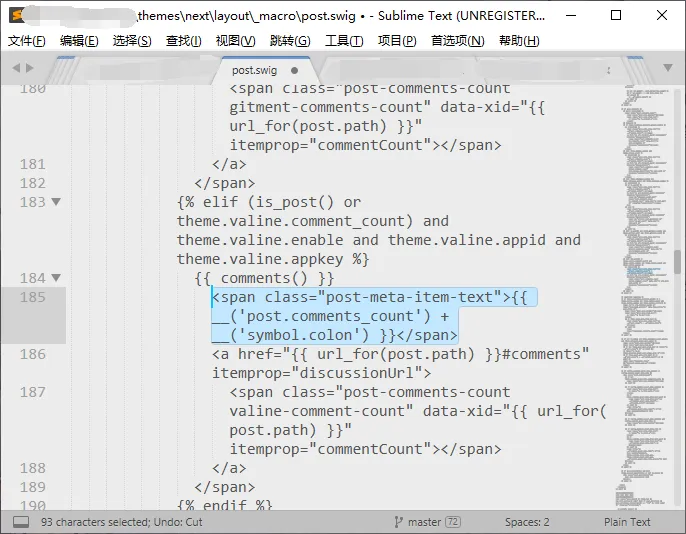
将其移动至
<a href="{{ url_for(post.path) }}#comments" itemprop="discussionUrl">后
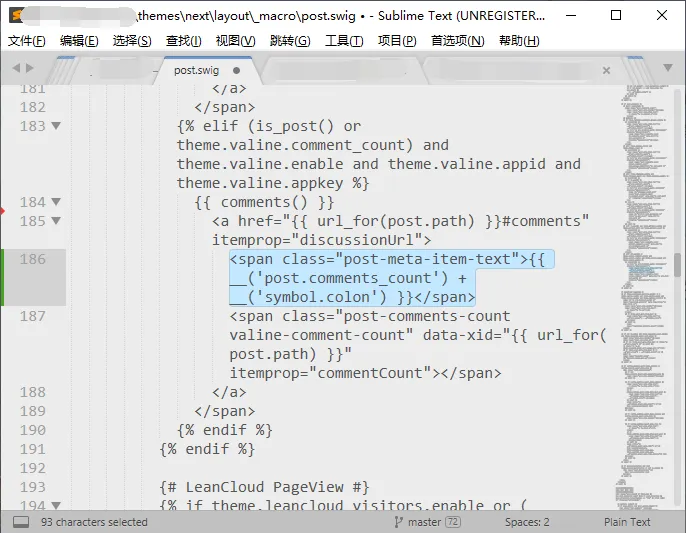
37.2. Valine 汉化#
Next 7.7.1+ 把原来的‘评论数’去掉了,现在只显示‘Valine’
打开 \hexo-theme-next\scripts\filters\comment\valine.js
查找 ${iconText('far fa-comment', 'valine')}
改为 <i class="far fa-comment"></i>评论数
若要为评论数增加超链接,则移动至 a 标签后,修改后完整代码:
  <span class="post-meta-item">
    <a title="valine" href="{{ url_for(post.path) }}#valine-comments" itemprop="discussionUrl">
    <i class="far fa-comment"></i>评论数
      <span class="post-comments-count valine-comment-count" data-xid="{{ url_for(post.path) }}" itemprop="commentCount"></span>
    </a>
</span>37.3. 去除冒号#

打开 \hexo-theme-next\languages\zh-CN.yml
查找 colon
将 ":"
改为 " "
38. 归档页英文标点修改#
38.1. 将英文感叹号修改为中文感叹号#
打开 \hexo-theme-next\layout\archive.njk
查找
{{ __('cheers.' + cheers) }}将 !
改为 !
38.2. 文本修改#
打开 \hexo-theme-next\languages\zh-CN.yml
找到对应文本自行修改即可
39. 图片懒加载#
39.1. Next 主题自带插件#
打开 \hexo-theme-next\_config.yml
查找 lazyload: false
将 false
改为 true
39.2. Hexo 插件 ①#
本节参考自 Troy’s 博客
安装 npm install hexo-lazyload-image --save
打开 \blog\_config.yml
添加
# LazyLoad
lazyload:
  enable: true
  onlypost: false
loadingImg: /images/loading.gifonlypost - 是否仅文章中的图片做懒加载, 如果为 false, 则主题中的其他图片,也会做懒加载,如头像、logo 等任何图片
loadingImg - 图片未加载时的代替图
使用格式
39.3. Hexo 插件 ②#
本节参考自 Robin-front
安装 npm install hexo-lazyload --save
打开 \blog\_config.yml
添加
lazyload:
  enable: true
  # thumbPath: '/images/thumb'
  # className: #optional e.g. .J-lazyload-img
# loadingImg: #optional eg. /images/loading.png40. 本地调用 FontAwesome#
打开文件夹 \blog\source
新建文件夹 fontawesome
下载 fontawesome--web
在 fontawesome 文件夹内放入文件 all.min.css 及文件夹 webfonts
打开 _config.next.yml
添加
vendors:
fontawesome: /fontawesome/all.min.css打开 \blog\source\fontawesome\all.min.css
将 ..
改为 .